This is a good excuse as any other to retake the blog back to life.
It has been a long, long time since I was writing here last time, and I have been doing quite different things since then. As part of the Igalia browsers team, I have been working on WebKit related projects (mostly WebKitGTK+ and Epiphany), contributing on Chromium and Blink, and dealing with the coverage of Media Source Extensions specification.
Now going back to the reason for this post, it was my first year both at FOSDEM and Brussels. I had an idea about the size of the event, but it was indeed quite impressive.
This year we had four talks from igalians there, sharing the state on a few things that some our teams have been working on. In this case, we were talking about OpenGL conformance validation, on our improvements on performance and testing with Pflua, and the progress on LibreOffice for Android.
In particular the Igalia talks at FOSDEM 2015 were the following ones:
The four of them were really cool, and they had a lot of people attending to (well done mates 😀 )
Also, after digesting the FOSDEM huge schedule, my plan was to get the most out of the profiling and multimedia related tracks, and a few other talks that were calling my attention.
There were some useful tricks at the Valgrind track and a nice overview on GStreamer portability. It was also curious finding RMS at the exhibition area. After a long conference day, it was Delirium Tremens time.
I found particularly interesting the one from Stormy Peters on how limited the understanding of the web is going to be for the next new billion users due to the devices used for it. I had also planned to attend to the one by Habib Virji (who I knew at the 2014 Web Engines Hackfest) but is talk on Web Security was full.
It was also curious the closing keynote on Mars One project. It would be fun if they manage to solve the (apparently still quite complex) open problems and this generation can witness a Mars colony.
To conclude, I think I probably rushed too much to get myself into an excessive amount of talks for 2 days, but it was great in any case to get info and fresh updates on the state of a lot of projects, meet some old friends, and breath some (literally) fresh air.
After several months working on the application, it’s now available the website of the project LibrePlan Audiovisual www.libreplan.com/audiovisual
It’s a section inside the main LibrePlan website, which has been the starting point for this adaptation oriented to solve problems identified on the companies of the audiovisual sector in Galicia. More specifically on the area of budget ellaboration and monitoring of audiovisual projects.
It was neccessary to have a tool to allow the standarization of budget creation on a collaborative way, and to ease controlling of costs and time deviations over the initial budget, produced during the ellaboration of adiovisual products, solving the problems due to be using other non specific tools.
The project has been developed by Igalia and Wireless Galicia with the collaboration of the Galician Audiovisual Cluster (CLAG), and financed with public fundings.
Among his main features we can remark the next ones:
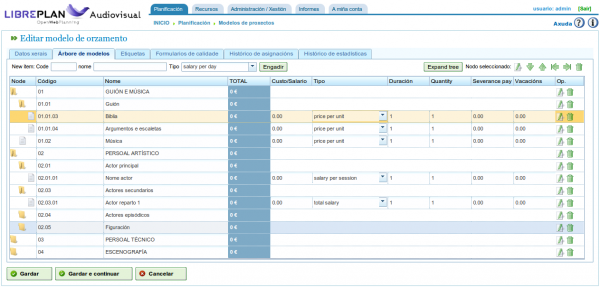
Budget templates system
Create new projects from configurable template trees with the budget structure and predefined data.
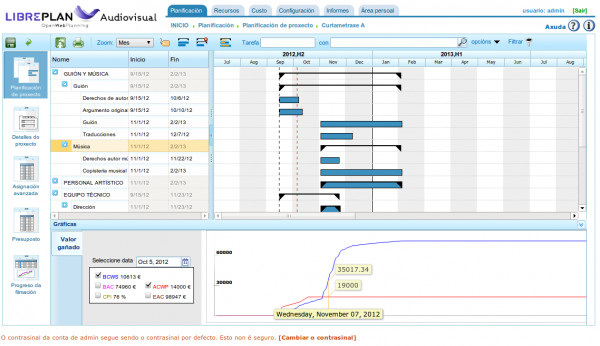
Budget execution forecast
Visualize and modify the distribution along time of the cost of the budget items, and compare the real costs to do the neccesary adjustments.
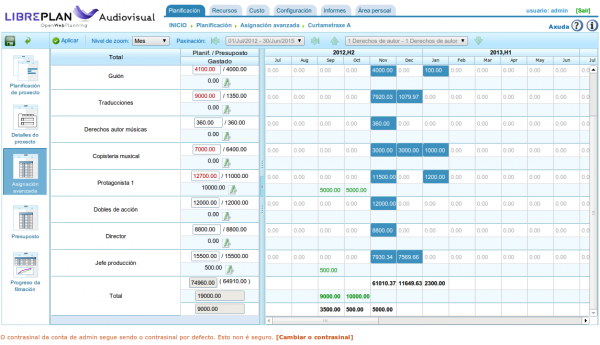
Advanced assignment of forecasts and cost details
Distribute in a fine grained detail level the expenses forecast, use the cost sheets to track the produced expenses during the project and integrate the costs system with other tools to import expenses through Web Services.
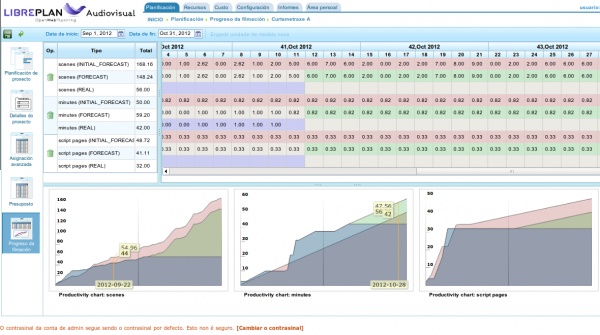
Filming productivities perspective
Measure the productivities on the ellaboration of the multimedia product being developed, according to different unit types (scenes, minutes or script pages). Define an initial filming plan, specifying the estimated productivities, compare them with the real measurements and adapt the forecasts.
Planning, expenses and payments plan reports
Generate printable reports either on PDF or HTML showing information on the project execution.
As the LibrePlan project, on which this solution is developed, LibrePlan Audiovisual is Open Source with AGPL license, and cam be downloaded and used freely.
In the same way, all the services offered on LibrePlan website related to its cloud plans, training, customization or support, are also availables for LibrePlan Audiovisual.
Thanks to all of us who made possible the existence of this tool, and I hope it can be useful to all organizations or companies interested on improving the planning, monitoring and control of their budgets.
Después de varios meses de trabajo en la aplicación, ya se encuentra disponible públicamente la web del proyecto LibrePlan Audiovisual www.libreplan.com/es/audiovisual
Se trata de una sección dentro de la web principal de LibrePlan, que ha sido el punto de partida de esta adaptación orientada a resolver las problemáticas identificados en empresas del sector audiovisual de Galicia. Concretamente en el ámbito de la elaboración y seguimiento presupuestario de los proyectos audiovisuales.
Se identificó la necesidad de disponer de una herramienta que permitiese estandarizar la creación de presupuestos de una forma colaborativa, y que facilitase el control de los desvíos en tiempo y coste sobre el presupuesto inicial que se producen en la elaboración de productos audiovisuales, solucionando problemas derivados del uso de otras herramientas no específicas.
El proyecto ha sido desarrollado por Igalia y Wireless Galicia con la colaboración del Clúster audiovisual de Galicia (CLAG), y financiado con fondos públicos.
Entre sus características principales se encuentran las siguentes:
Sistema de plantillas de presupuesto y modelo ICAA
Crea nuevos presupuestos a partir de modelos de plantillas configurables en los que organizar los elementos y subelementos en los que se estructurarán, siendo posible partir del modelo precargado de presupuesto ICAA.
Plan de previsión de ejecución de presupuesto
Realiza la previsión temporal del gasto de los items del presupuesto, y compárala con los gastos reales que se producen durante la ejecución del proyecto para realizar los ajustes necesarios.
Administración avanzada de previsiones y costes
Distribuye de forma manual las previsiones de gasto en el intervalo del proyecto con el nivel de granularidad temporal que se desee.
Perspectiva de progreso de rodaje
Contrasta las productividades en el proceso de elaboración del producto multimedia desarrollado, en función de diferentes tipos de unidades (escenas, minutos o páginas de guión), y realiza los ajustes necesarios para cumplir los plazos objetivo.
Informes de planificación, de gastos y plan de pagos
Genera informes imprimibles y descargables en los que se muestra la información del estado de ejecución del proyecto. También puedes, planificar los pagos de los gastos reportados de forma inmediata, con un margen fijo de días o manualmente, a nivel de proyecto o por tarea.
Al igual que el proyecto LibrePlan sobre el que está desarrollada esta solución, LibrePlan Audiovisual es Software Libre con licencia AGPL, y puede ser descargado y utilizado libremente.
Del mismo modo, todos los servicios ofrecidos en la web de LibrePlan relativos a su uso en la nube, formación, personalización o soporte, también se encuentran disponibles para LibrePlan Audiovisual.
Mi agradecimiento a todos los que hemos hecho posible la existencia de esta herramienta y espero que pueda resultar de utilidad a todas aquellas organizaciones o empresas interesadas en mejorar la planificación, seguimiento y control de sus presupuestos.
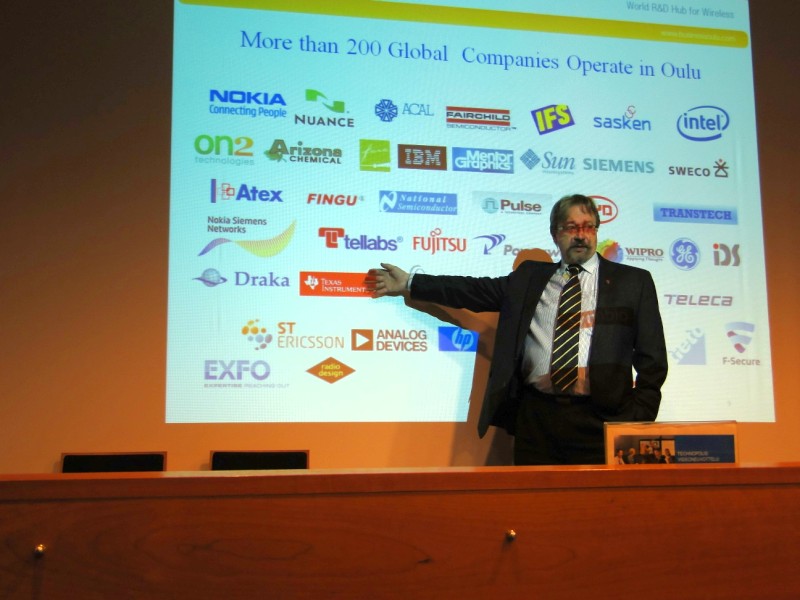
The last stage of our trip was in the north of Finland. We were gently received by Janne Mustonen from Oulu Innovation who was the one coordinating our meetings.
We met Sari Päivärinta from Nokia Mobile Zone, where they showed us some really interesting projects that are being developed, like secure payments through SMS, or applications control with a small ball, for instance. We also tried swype input method, which worked really fine.
Tomi Väisänen gave us a speech on code testing and security and introduced Codenomicon tool Defensics.
We also had meetings with Esa Posio from Center for Internet Excellence (University of Oulu) and Heikki Ailisto from VTT Technical Research center of Finland, who were talking about their collaboration models and how they encourage partnership. Again, it’s amazing how the public sector, companies and Universities work together to help entrepreneurship.
Annti Pelkonen from Ixonos was explaining us their expertize areas, focused on application development for Symbian and also on an open source web application for citizens portals, based on Alfresco, that is being used in many councils in Finland.
In the afternoon, we went to Technopolis Smarthouse where Juha Ala-Mursula from Bussiness Oulu, and Martti Elsilä explained us the City of Oulu Ecosystem and the services provided by Technopolis to set up in Finland.
I think that in the end I will be considering the option of moving to Scandinavia :-).
Yet in Oslo, we visited IKT Norge where Fredrik Syversen (Director of Development) received us, and explained the main purposes of the institute for the Norwegian ICT industry.
There, Liv Freihow and Benedicte Fasmer showed us the big projects Norway is carrying out regarding green technology by creating huge data centers in the north, using the natural cooling systems and recycling the extracted heat.
We were talking later on with Torgeir Waterhouse (Director of internet and new media) about how they are increasing their participation in open source initiatives, and showed explicit interest on our expertize on MeeGo and Webkit.
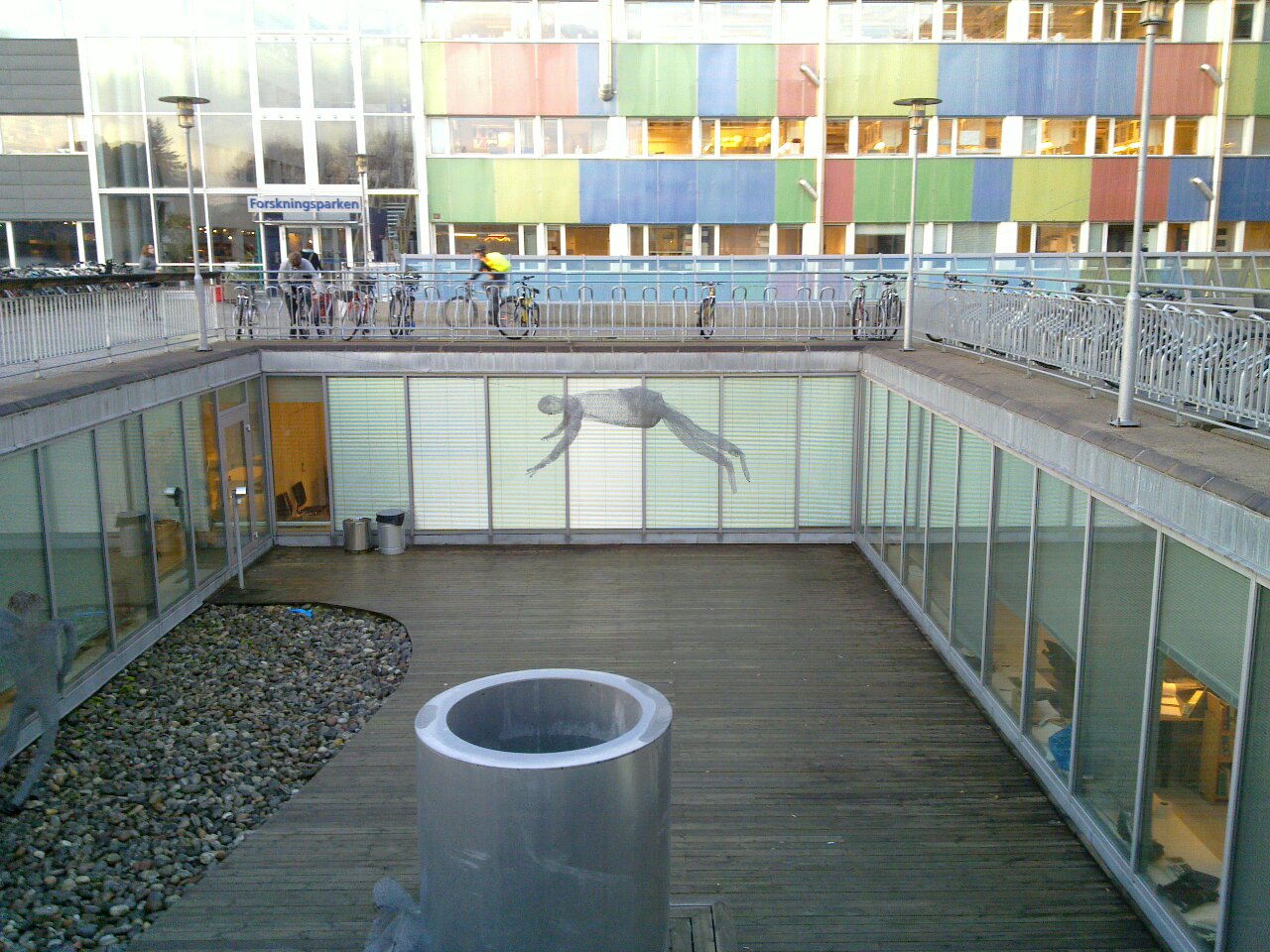
We also visited Monika Svanberg at Forskningsparken which is more focused on helping start-ups. and gave us some hints on how to collaborate with different strategic sectors on Norway.
During this week, Igalia is taking part on a technological visit to Nordic IT research centers. Our purpose is to learn from them in which areas they are focusing their innovation, and study how our experience could be used to create common opportunities. Also we would like to open new collaborative paths for the work being done from the web group, and more concretely for NavalPlan application, either by getting in touch with free software associations interested in providing solutions based on this free software planning tool, or industrial clusters that could consider its evaluation.
The two days I was at Stockholm I could met the next people:
Daniel Stenberg and Simon Josefsson from Fossgrupen, seeing that we are hacking on related technologies as libsoup, tinymail/modest and Kerberos protocol, or GTK stuff, for instance (Andreas Nilsson is part of that group). As they have also connections with companies providing services to different sectors, that leaves a path open for opportunities based on NavalPlan web application.
At Kista, we met Hans Hentzell, the CEO of Swedish ICT, explaining how this group of research institutes is open to collaboration with European companies interested in joint investigation projects. He introduced us Acreo, a little bit more focused on pure electronics.
We met Ingvar Sjöberg, head of Digital Art Center, and the guy who designed the Mindball! As far as art and creativity, on particular in the web, is conditioned by the browsers, we see that the work that is being done on engines like WebKit it is an important factor in their success.
After a some of rest (we slept just too little during the conferences) and catching up with the mail, I was willing to devote some time to write about my notes and feelings these days in Berlin.
Just to sum up, the whole thing was just awesome! We knew a lot of great people there and learned so many things. We are surprised with the maturity and possibilities around JavaScript community, and how they will have even more presence in the short term.
The speakers were all important people from the variety of JS related feet, just missed some speech about Gnome Shell. In some months time all GNOME 3 users around the world will be running JavaScript in their desktops. That’s millions of people! We talked a lot about this with many people and everybody was really interested about it. In fact, a BoF about was almost proposed. In future JSConf editions we should try to get something presented on Gjs.
I have plenty of annotations, tools to test and things to take a look at, but for the record, some interesting quotes 🙂
Saturday
We already knew some people from the welcome party the day before (Sergi and Irakli from Tom Tom, Tobie Langel and Peter Svensson who were talking on Sunday) and after the ‘expect bacon’ breakfast the conference started. Briefing:
Dion AlmaerThe Future of Web Applications He showed his vision about the evolution of the technology with an interesting perspective on the fuzzy division among the web and the desktop in the short term. It was really funny the Everythings Amazing & Nobody is Happy video from Louis CK, and this really applies to the software we are creating.
Francisco TomalskyBuilding Desktop-Caliber Web Apps With Cappuccino and Atlas An impressive talk and demo about Cappuccino (Cocoa on the web) and Atlas. They also are the responsibles of Mockingbird. We were talking with the these guys, and it may be possible to have this all this stuff running on GNU/Linux soon.
Andy Tijn and Thomas SchuppelMobile JS and browsers, performance and memory optimization and mobile web based UIs The guys from Nokia OVI also rocked it. They were describing its creation a brand to coordinate all developments for the different devices around a common web oriented language + webkit. JavaScript is the cornerstone and definitively it will be an the key part in future either local or online services in smartphones and tablets. Great party by the way.
Douglas CrockfordDouglas Crockford Speaking at JSConf.eu: The state and future of JavaScript One of the most expected speeches. The surprise topic was how the ECMA T39 standardization progress goes, and the problems they are having to found an agreement with the floating point format number IEE745. Also related with his experience from the standardization process: “It’s the time to close the patent offices. Nobody wins except the lawyers“.
And later on the Nokia party was also really good. The snacks were great, all the food we had at Berlin, in fact. We also had a little bit of time to go for a walk and see the Brandenburg Gate spectacularly lit for the 20th anniversary of the Fall of The Wall.
Sunday
Amy HoyHard Refresh – Not Just Another LightboxVery innovative ideas about concepts on web design and user interaction (Motion, Interaction, Graphics and Differentiation). I promised her that I would be sending her a copy of the t-shirt I have in mind with the great quote I borrowed from her blog “If you polish shit, all you get is shit that’s shiny“.
Ryan DahlNode.js, Evented I/O for V8 Javascript We were really interested in this speech as it was giving hints on threading and handling of high concurrence environments, that apply to DBUS problematic in GNOME
Steve Souders Performance Really interesting his analysis on the emotional reaction that makes the user feel slowness, and the tools he introduced browserscope.org, webpagetest.org, spriteme and pagespeed. Progressive rendering and enhancement are needed, deliver HTML first and defer JS loading and decoration.
Tobie LangelUnittesting JavaScript with Evidence He explained his motivations to create a new unit testing suit, based on the necessity of making it framework agnostic
Faruk AteşJavaScript in the age of HTML 5 and CSS 3 A great presentation on how to manage advanced CSS3 features from an agent independant point of view. It started in a shocking way: ‘All the webs don’t need to look the same in different browsers. Equal vs. similar‘. The idea is that some visual enhancements can be managed from each separate feature, and not in terms of user agent, and it will be the responsibility of the developer to implement the rest or not. It can be experienced what he ment in his site, accesing it with webkit based browsers, Gecko or others, and check the CSS transparencies, rounded corners and animated transitions. I had also an interesting discussion with him to ask for his opinion on the improvements planned for the webkit hackfest and he would be glad offering his point of view in the priorities from a designer point of view.
Jörn ZaeffererDeveloping web applications with jQuery UI Gave a quick overview on creating a shop from the scratch with jQuery. An interesting question was asket regarding to interaction in newer smartphones, to which the roadmap will have to manage interaction with multitouch events
Nicole SullivanA little off topic: on OOCSS Useful set of hints and techniques to keep CSS under control and make the architecture of the presentation styles more coherent. I do agree with her ‘code is fragile’ quote, and that’s even more explicit in CSS, but it’s still difficult to avoid.
Fabian JakobsAutopsy of a Widget An step-by-step implementation of a spinner component
John ResigUnderstanding JavaScript Testing Some more comparison on testing suites. As Tobie already covered that, he also included a part of profiling. It was funny to find out that IE benchmarking works better emulated, as getTime() function gives more accurate results than 0 and 16 ;p
Then another informal party in the Lounge of the Ïma Design Village, where all the conferences were done, a really cool place by the way.
This is as summarized as I could, an overview of what I saw at Berlin. For any other information I could have ask me, or see the rest of stuff is in their web, slideshare, Flickr, Twitter and so on ;p
It doesn’t mention a lot of other important things related with its highly skilled and great human group that Igalia consists of, its experience and implication in projects, the constant search for welfare and so on but you can have an idea. It requires sometimes a hard work but it has been successful until now.
Management of scrolls in different areas of your page it’s as easy to attach a listener to the component where the scrolls are shown in order to change the positioning properties of the simulated scrollable attached area when the scrollbars are used. A couple of things to keep in mind are that the javascript-scrolled area should have the same dimensions that the main one in order to handle the same amount of displacement with the scrolls, and depending on the need of explicitly showing the secondary scrollbar or not CSS display property should be set properly.
A very basic example would be just moving this examples here, a couple of simple HTML boxes:
This produces the displayed result. Our purpose is to add an action listener to onScroll first component in order to get the second box moved when we scroll the first one:
Scrollable box
Lorem ipsum dolor sit amet, consectetur adipiscing elit.
Nunc mollis ante ut sapien venenatis porttitor. Aliquam vel justo nec nisi mattis tempus
in eget magna. Sed vitae risus et nulla placerat laoreet. Pellentesque habitant morbi tristique
senectus et netus et malesuada fames ac turpis egestas. Duis vestibulum velit a sapien bibendum
laoreet. Nulla nec sapien et orci tincidunt tempor. Proin orci metus, egestas at sodales vitae, sodales vitae erat.
Self-scrolled box
Lorem ipsum dolor sit amet, consectetur adipiscing elit.
Nunc mollis ante ut sapien venenatis porttitor. Aliquam vel justo nec nisi mattis tempus
in eget magna. Sed vitae risus et nulla placerat laoreet. Pellentesque habitant morbi tristique
senectus et netus et malesuada fames ac turpis egestas. Duis vestibulum velit a sapien bibendum
laoreet. Nulla nec sapien et orci tincidunt tempor. Proin orci metus, egestas at sodales vitae, sodales vitae erat.
This strategy works fine for simultaneous synchronization but we have checked a different behavior for listeners attached to scrollbars in the different browser engines. In WebKIT based browsers with its Javascript engines (as Squirrelfish in Epiphany or v8 in Chrome), all listeners are processed when the browser implementation fiscally scrolls the component, so the movement is perfectly synchronized. For Gecko plus Tracemonkey, the effect that can be perceived is that scroll in the first component is slightly delayed. To avoid this, it’s necessary to scroll both components using Javascript, and creating a third element just with the scrollbar. The result can be checked evolving the previous example.
Self-scrolled box 1
Lorem ipsum dolor sit amet, consectetur adipiscing elit.
Nunc mollis ante ut sapien venenatis porttitor. Aliquam vel justo nec nisi mattis tempus
in eget magna. Sed vitae risus et nulla placerat laoreet. Pellentesque habitant morbi tristique
senectus et netus et malesuada fames ac turpis egestas. Duis vestibulum velit a sapien bibendum
laoreet. Nulla nec sapien et orci tincidunt tempor. Proin orci metus, egestas at sodales vitae, sodales vitae erat.
Aliquam sed lorem a ante vestibulum pharetra. Nullam lobortis facilisis tincidunt. Quisque id libero ante, in aliquet orci.
Self-scrolled box 2
Lorem ipsum dolor sit amet, consectetur adipiscing elit.
Nunc mollis ante ut sapien venenatis porttitor. Aliquam vel justo nec nisi mattis tempus
in eget magna. Sed vitae risus et nulla placerat laoreet. Pellentesque habitant morbi tristique
senectus et netus et malesuada fames ac turpis egestas. Duis vestibulum velit a sapien bibendum
laoreet. Nulla nec sapien et orci tincidunt tempor. Proin orci metus, egestas at sodales vitae, sodales vitae erat.
Aliquam sed lorem a ante vestibulum pharetra. Nullam lobortis facilisis tincidunt. Quisque id libero ante, in aliquet orci.
Things get really complicated when it’s necessary to scroll intersected areas inside a complex layout with the need to stick scrollable components over the main area, in a desktop application style approach, let’s say for instance a Gantt application layout. In this scenario we have to combine this technique with CSS positioning of related elements, manage its resizing and binding different methods to each dimension scrolling, but the main idea is the same one.
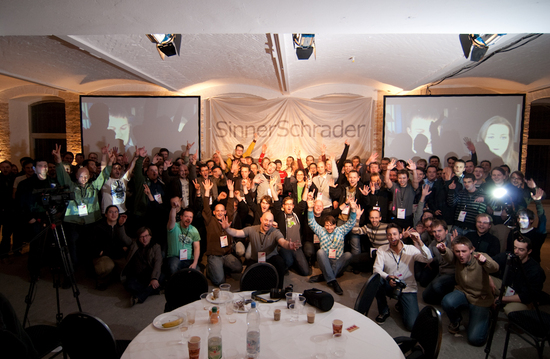
After some doubts about if we were going to be able to register, we finally could sign up for JSConf.eu 2009, so two people from Igalia are going be in Berlin the 7th and 8th of November.
Javascript is one of the transversal technologies in Igalia and this is the reason why there will be people in the conferences that has been working both on Desktop Mobile and Web Application Development groups.
Some of us already have quite a lot of experience with Server-Side communications with JS, and we are willing to go deeper in its usage to more advanced RIA oriented features within the scope of our ZK scheduling application.
We hope to get a lot of interesting ideas and boost our knowledge in the different frameworks that are going to be explored, have an insight in future opportunities, and of course, know people and have fun!


 Javascript is one of the transversal technologies in Igalia and this is the reason why there will be people in the conferences that has been working both on Desktop Mobile and Web Application Development groups.