Performance analysis of Grid Layout

Now that we have a quite complete implementation of CSS Grid Layout specification it’s time to take care of performance analysis and optimizations. In this essay, which is the first of a series of posts about performance, I’ll first introduce briefly how to use Blink (Chrome) and WebKit (Safari) performance analysis tools, some of the most interesting cases I’ve seen during my work on the implementation of this spec and, finally, a basic case to compare Flexbox and Grid layout models, which I’d like to evolve and analyze further in the coming months.

Performance analysis tools

Both WebKit and Blink projects provide several useful and easy to use scrips (python) to run a set of test cases and take different measurements and early analysis. They were written before the fork, that’s why related documentation can be found at WebKit’s track, but both engines still uses them, for the time being.

Tools/Scripts/run-perf-tests
Tools/Scripts/webkitpy/performance_tests/

There are a wide set of performance tests under PerformanceTest folder, at Blink’s/WebKit’s root directory, but even though both engines share a substantial number of tests, there are some differences.

(blink’s root directory) $ ls PerformanceTests/
Bindings BlinkGC Canvas CSS DOM Dromaeo Events inspector Layout Mutation OWNERS Parser resources ShadowDOM Skipped SunSpider SVG XMLHttpRequest XSSAuditor

Chromium project has introduced a new performance tool, called Telemetry, which in addition of running the above mentioned tests, it’s designed to execute more complex cases like running specific PageSets or doing benchmarking to compare results with a preset recording (WebPageRelay). It’s also possible to send patches to performance try bots, directly from gclient or git (depot_tools) command line. There are quite much information available in the following links:

Regarding profiling tools, it’s possible both in Webkit and Blink to use the –profiler option when running the performance tests so we can collect profiling data. However, while WebKit recommends perf for linux, Google’s Blink engine provides some alternatives.

CSS Grid Layout performance tests and current status

While implementing a new browser feature is not easy to measure performance while code evolves so much and quickly and, what it’s worst, be aware of regressions introduced by new logic. When the feature’s syntax changes or there are missing or incomplete functionality, it’s not always possible to establish a well defined baseline for performance. It’s also a though decision to determine which use cases we might care about; obviously the faster the better, but adding performance optimizations usually complicates code, it may affect its robustness and it could lead to unexpected, and even worst, hard to find bugs.

At the time of this writing, we had 3 basic performance tests:

Why we have selected those uses cases to measure and keep track of performance regression ? First of all, note that auto-sizing one of the most expensive branches inside the grid track sizing algorithm, so we are really interested on both, improving it and keeping track of regressions on this code path.

body {
    display: grid;
    grid-template-rows: repeat(100, auto);
    grid-template-columns: repeat(20, auto);
}
.gridItem {
    height: 200px;
    width: 200px;
}

On the other hand, fixed-sized is the easiest/fastest path of the algorithm, so besides the importance of avoiding regressions (when possible), it’s also a good case to compare with auto-sized.

body {
    display: grid;
    grid-template-rows: repeat(100, 200px);
    grid-template-columns: repeat(20, 200px);
}
.gridItem {
    height: 200px;
    width: 200px;
}

Finally, a stretching use cases was added because it’s the default alignment value for grid items and the two test cases already described use fixed size items, hence no stretch (even though items fill the whole grid cell area). Given that I implemented CSS Box Alignment support for grid I was conscious of how expensive the stretching logic is, so I considered it an important use case to analyze and optimize as much as possible. Actually, I’ve already introduced several optimizations because the early implementation was quite slow, around 40% slower than using any other basic alignment (start, end, center). We will talk more about this later when we analyze a case to compare Flexbox and Grid performance in layout.

body {
    display: grid;
    grid-template-rows: repeat(100, 200px);
    grid-template-columns: repeat(20, 200px);
}
.gridItem {
    height: auto;
    width: auto;
}

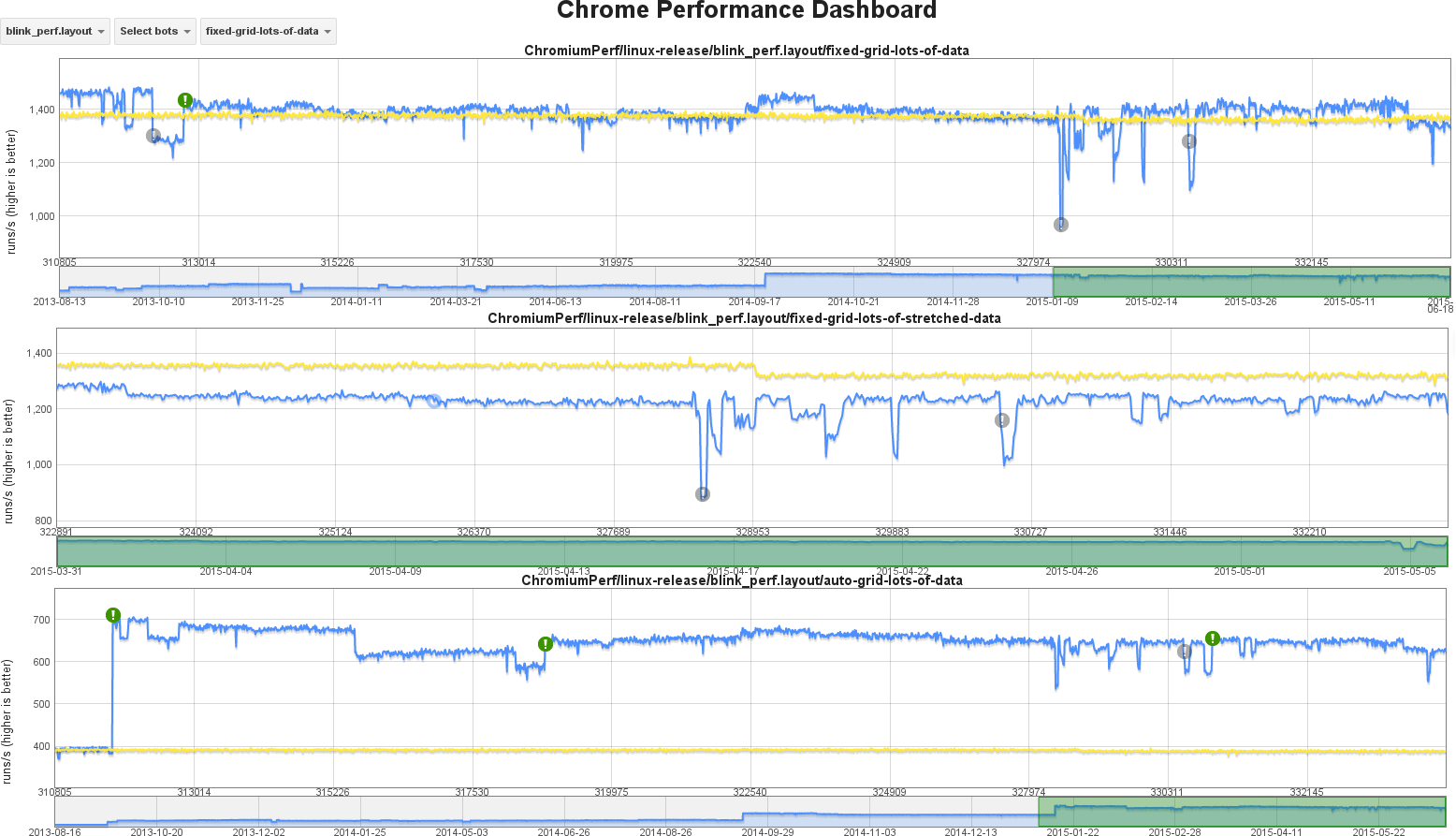
The basic HTML body of these 3 tests is quite simple because we want to analyze performance of very specific parts of the Grid Layout logic, in order to detect regressions in sensible code paths. We’d like to have eventually some real use cases to analyze and create many more performance tests, but chrome performance platform it’s definitively not the place to do so. The following graphs show performance evolution during 2015 for the 3 tests we have defined so far.
grid-performance-overview

Note that yellow trace shows data taken from a reference build, so we can discount temporary glitches on the machine running the performance tests of target build, which are shown in the blue trace; this reference trace is also useful to detect invalid regression alerts.

Why performance is so different for these cases ?

The 3 tests we have for Grid Layout use runs/second values as a way to measure performance; this is the preferred method for both WebKit and Blink engines because we can detect regressions with relatively small tests. It’s possible, though, to do other kind of measurements. Looking at the graphs above we can extract the following data:

  • auto-sized grid: around 650 runs/sec
  • fixed-sized grid: around 1400 runs/sec
  • fixed-sized stretched grid: around 1250 runs/sec

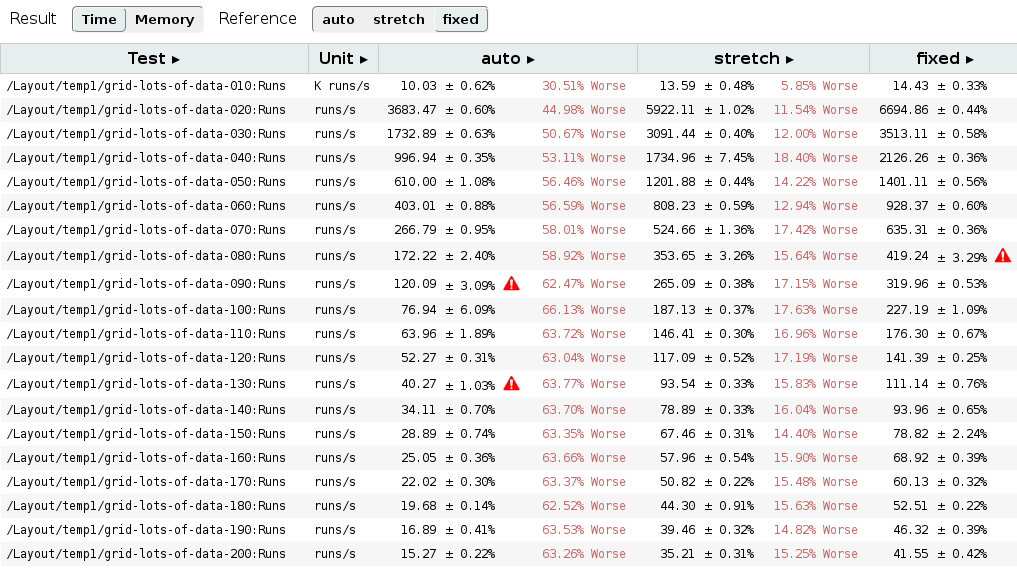
Before analyzing possible causes of performance drop for each case, I’ve defined some additional tests to stress even more these 3 cases, so we can realize how grid size affect to the obtained results. I defined 20 tests for these cases, each one with different grid items; from 10×10 up to 200×200 grids. I run those tests in my own laptop, so let’s take the absolute numbers of each case with a grain of salt; although differences between each of these 3 scenarios should be coherent. The table below shows some numeric results of this experiment.
grid-fixed-VS-auto-VS-stretch

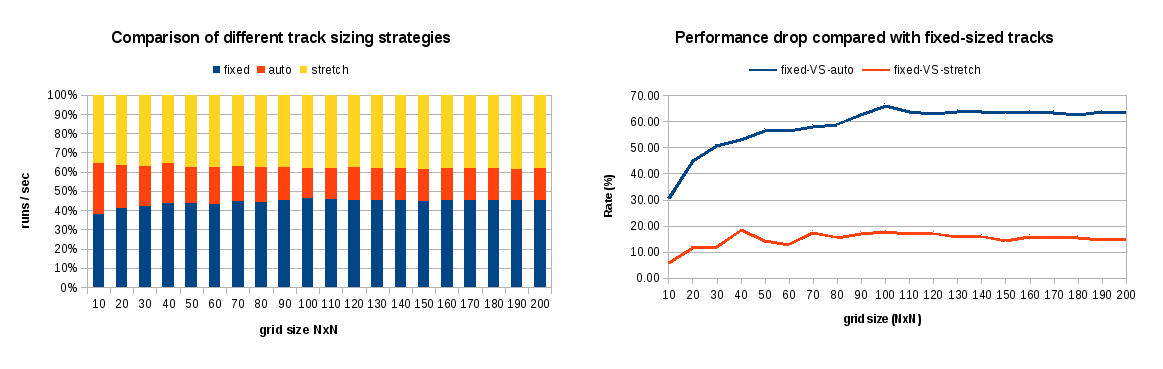
First of all, recall that these 3 tests produce the same web visualization, consisting of grids with NxN items of 100px each one. The only difference is the grid layout strategy used to produce such result: auto-sizing, fixed-sizing and stretching. So now, focusing on previous table’s data we can evaluate the cost, in terms of layout performance, of using auto-sized tracks for defining the grid (which may be the only solution for certain cases). Performance drop is even growing with the number of grid items, but we can conclude that it’s stabilized around 60%. On the other hand stretching is also slower but, unlike auto-sized, in this case performance drop does not show a high dependency of grid size, more or less constant around 15%.
grid-performance-graphs-2

Impact of auto-sized tracks in layout performance

Basically, the track sizing algorithm can be described in the following 4 steps:

  • 1- Initialize per Grid track variables.
  • 2- Resolve content-based TrackSizingFunctions.
  • 3- Grow all Grid tracks in GridTracks from their baseSize up to their growthLimit value until freeSpace is exhausted.
  • 4- Grow all Grid tracks having a fraction as the MaxTrackSizingFunction.

These steps will be executed twice, first cycle for determining column tracks’s size and another cycle to set row tracks’s size which it may depend on grid’s width. When using just fixed-sized tracks in the very simple case we are testing, the only computation required to determine grid’s size is completing step 1 and determining free available space based on the specified fixed-size values of each track.

// 1. Initialize per Grid track variables.
for (size_t i = 0; i < tracks.size(); ++i) {
    GridTrack& track = tracks[i];
    GridTrackSize trackSize = gridTrackSize(direction, i);
    const GridLength& minTrackBreadth = trackSize.minTrackBreadth();
    const GridLength& maxTrackBreadth = trackSize.maxTrackBreadth();
 
    track.setBaseSize(computeUsedBreadthOfMinLength(direction, minTrackBreadth));
    track.setGrowthLimit(computeUsedBreadthOfMaxLength(direction, maxTrackBreadth, track.baseSize()));
 
    if (trackSize.isContentSized())
        sizingData.contentSizedTracksIndex.append(i);
    if (trackSize.maxTrackBreadth().isFlex())
        flexibleSizedTracksIndex.append(i);
}
for (const auto& track: tracks) {
    freeSpace -= track.baseSize();
}

Focusing now on the auto-sized scenario, we will have the overhead of resolving content-sized functions for all the grid items.

// 2. Resolve content-based TrackSizingFunctions.
if (!sizingData.contentSizedTracksIndex.isEmpty())
    resolveContentBasedTrackSizingFunctions(direction, sizingData);

I didn’t add source code of resolveContentBasedTrackSizingFunctions because it’s quite complex, but basically it implies a cost proportional to the number of grid tracks (minimum of 2x), in order to determine minContent and maxContent values for each grid item. It might imply additional computation overhead when using spanning items; it would require to sort them based on their spanning value and iterate over them again to resolve their content-sized functions.

Some issues may be interesting to analyze in the future:

  • How much each content-sized track costs ?
  • What is the impact on performance of using flexible-sized tracks ? Would it be the worst case scenario ? Considering it will require to follow the four steps of track sizing algorithm, it likely will.
  • Which are the performance implications of using spanning items ?

Why stretching is so performance drain ?

This is an interesting issue, given that stretch is the default value for both Grid and Flexbox items. Actually, it’s the root cause of why Grid beats Flexbox in terms of layout performance for the cases when stretch alignment is used. As I’ll explain later, Flexbox doesn’t have the optimizations I’ve implemented for Grid Layout.

Stretching logic takes place during the grid container layout operations, after all tracks have their size precisely determined and we have properly computed all grid track’s positions relatively to the grid container. It happens before the alignment logic is executed because stretching may imply changing some grid item’s size, hence they will be marked for layout (if they wasn’t already).

Obviously, stretching only takes place when the corresponding Self Alignment properties (align-self, justify-self) have either auto or stretch as value, but there are other conditions that must be fulfilled to trigger this operation:

  • box’s computed width/height (as appropriate to the axis) is auto.
  • neither of its margins (in the appropriate axis) are auto
  • still respecting the constraints imposed by min-height/min-width/max-height/max-width

In that scenario, stretching logic implies the following operations:

LayoutUnit stretchedLogicalHeight = availableAlignmentSpaceForChildBeforeStretching(gridAreaBreadthForChild, child);
LayoutUnit desiredLogicalHeight = child.constrainLogicalHeightByMinMax(stretchedLogicalHeight, -1);
 
bool childNeedsRelayout = desiredLogicalHeight != child.logicalHeight();
if (childNeedsRelayout || !child.hasOverrideLogicalContentHeight())
    child.setOverrideLogicalContentHeight(desiredLogicalHeight - child.borderAndPaddingLogicalHeight());
if (childNeedsRelayout) {
    child.setLogicalHeight(0);
    child.setNeedsLayout();
}
 
LayoutUnit LayoutGrid::availableAlignmentSpaceForChildBeforeStretching(LayoutUnit gridAreaBreadthForChild, const LayoutBox& child) const
{
    LayoutUnit childMarginLogicalHeight = marginLogicalHeightForChild(child);
 
    // Because we want to avoid multiple layouts, stretching logic might be performed before
    // children are laid out, so we can't use the child cached values. Hence, we need to
    // compute margins in order to determine the available height before stretching.
    if (childMarginLogicalHeight == 0)
        childMarginLogicalHeight = computeMarginLogicalHeightForChild(child);
 
    return gridAreaBreadthForChild - childMarginLogicalHeight;
}

In addition to the extra layout required for changing grid item’s size, computing the available space for stretching adds an additional overhead, overall if we have to compute grid item’s margins because some layout operations are still incomplete.

Given that grid container relies on generic block’s layout operations to determine the stretched width, this specific logic is only executed for determining the stretched height. Hence performance drop is alleviated, compared with the auto-sized tracks scenario.

Grid VS Flexbox layout performance

One of the main goals of CSS Grid Layout specification is to complement Flexbox layout model for 2 dimensions. It’s expectable that creating grid designs with Flexbox will be more inefficient than using a layout model specifically designed for these cases, not only regarding CSS syntax, but also regarding layout performance.

However, I think it’s interesting to measure Grid Layout performance in 1-dimensional cases, usually managed using Flexbox, so we can have comparable scenarios to evaluate both models. In this post I’ll start with such cases, using a very simple one in this occasion. I’d like to get more complex examples in future posts, the ones more usual in Flexbox based designs.

So, let’s consider the following simple test case:

<div class="className">
   <div class="i1">Item 1</div> 
   <div class="i2">Lorem ipsum dolor sit amet, consectetur adipiscing elit, sed do eiusmod tempor incididunt ut labore et dolore magna aliqua.</div>
   <div class="i3">Item 3 longer</div>
</div>

I evaluated the simple HTML example above with both Flexbox and Grid layouts to measure performance. I used a CPU profiler to figure out where the bottlenecks are for each model, trying to explain where differences came from. So, I defined 2 CSS classes for each layout model, as follows:

.flex {
    background-color: silver;
    display: flex;
    height: 100px;
    align-items: start;
}
.grid {
    background-color: silver;
    display: grid;
    grid-template-columns: 100px 1fr auto;
    grid-template-rows: 100px;
    align-items: start;
    justify-items: start;
}
.i1 { 
    background-color: cyan;
    flex-basis: 100px; 
}
.i2 { 
    background-color: magenta;
    flex: 1; 
}
.i3 { 
    background-color: yellow; 
}

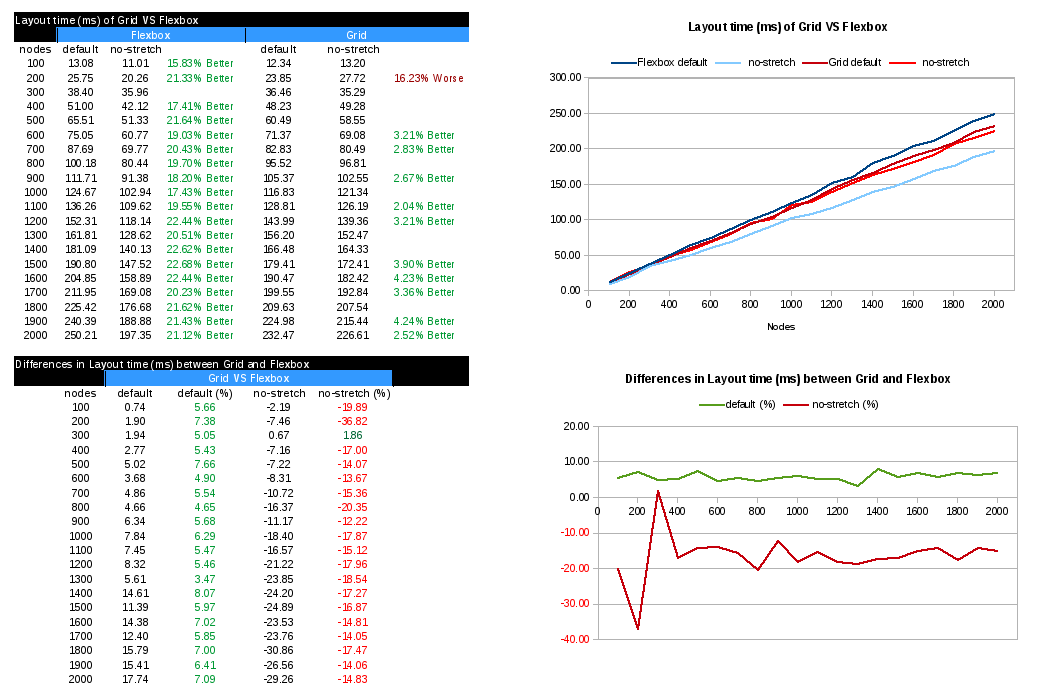
Given that there is not concept of row in Flexbox, I evaluated performance of 100 up to 2000 grid or flex containers, creating 20 tests to be run inside the chrome performance framework, described at the beginning of this post. You can check out resources and a script to generate them at our github examples repo.
flexVSgrid

When comparing both layout models targeting layout times, we see clearly that Grid Layout beats Flexbox using the default values for CSS properties controlling layout itself and alignment, which is stretch for these containers. As it was explained before, the stretching logic adds an important computation overhead, which as we can see now in the numeric table above, has more weight for Flexbox than Grid.

Looking at the plot about differences in layout time, we see that for the default case, Grid performance improvement is stabilized around 7%. However, when we avoid the stretching logic, for instance by using any other alignment value, layout performance it’s considerable worse than Flexbox, for this test case, around 15% slower. This is something sensible, as this test case is the idea for Flexbox, while a bit artificial for Grid; using a single Grid with N rows improves performance considerably, getting much better numbers than Flexbox, but we will see these cases in future analysis.

Grid layout better results for the default case (stretch) are explained because I implemented several optimizations for Grid. Probably Flexbox should do the same, as it’s the default value and it could affect many sites using this layout model in their designs.

Thanks to Bloomberg for sponsoring this work, as part of the efforts that Igalia has been doing all these years pursuing a better and more open web.

Igalia & Bloomberg logos

Distributing tracks along Grid Layout container

In my last post I introduced the concept of Content Distribution alignment and how it affects Grid Layout implementation. At that time, it was possible to use all the <content-position> values to select grid tracks position inside a grid container, moving them across the available space. However, it wasn’t until recently that users can distribute grid tracks along such available space, literally adding gaps in between or even stretching them.

In this post I’ll describe how each <content-distribution> value affect tracks in a Grid Layout, their position and size, using different grid structures (eg. number of tracks, span).

Let’s start analyzing the new Content Distribution alignment syntax defined in the CSS Box Alignment specification:

auto | <baseline-position> | <content-distribution> || [ <overflow-position>? && <content-position> ]

In case of a <content-distribution> value can’t be applied, its associated fallback <content-distribution> value should be used instead. However, this CSS syntax allow users to specify a preferred fallback value:

If both a <content-distribution> and <content-position> are given, the <content-position> provides an explicit fallback alignment.

Before going into each value, I think it’s a good idea to refresh the concepts of alignment container and alignment subject and how they apply in the context of Grid Layout:

The alignment container is the grid container’s content box. The alignment subjects are the grid tracks.

The different <content-distribution> values that can be used for align-content and justify-content CSS properties are defined as follows:

  • space-betweenThe alignment subjects are evenly distributed in the alignment container. Default fallback: start.
  • space-aroundThe alignment subjects are evenly distributed in the alignment container, with a half-size space on either end. Default fallback: center.
  • space-evenlyThe alignment subjects are evenly distributed in the alignment container, with a full-size space on either end. Default fallback: center.
  • stretchAny auto-sized alignment subjects have their size increased equally (not proportionally) so that the combined size exactly fills the alignment container. Default fallback: start.

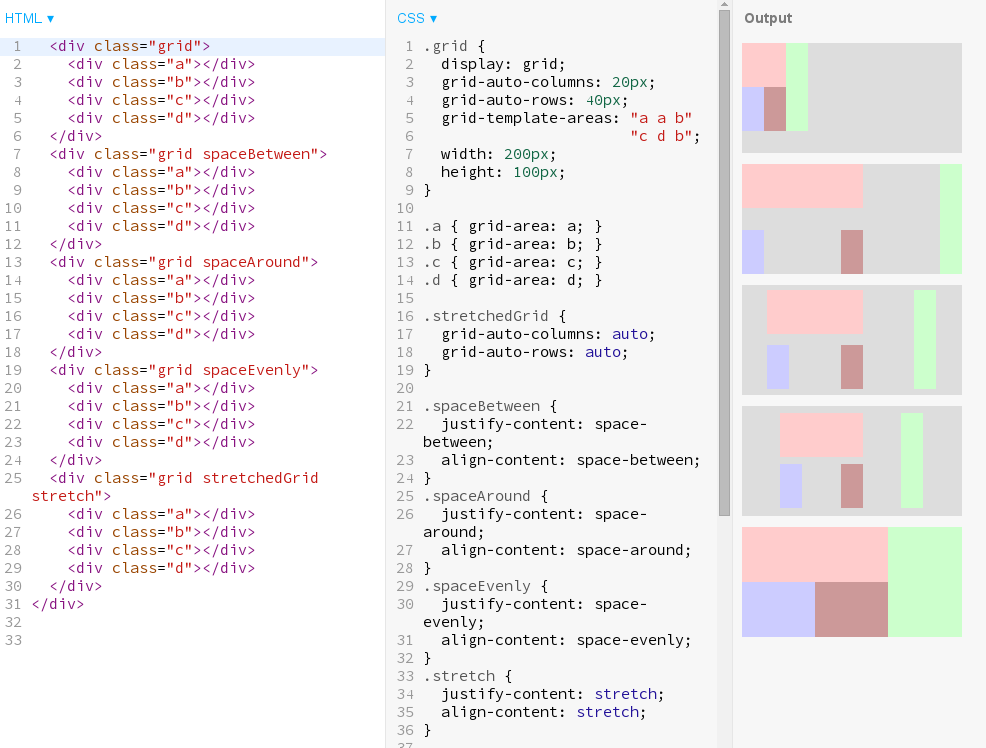
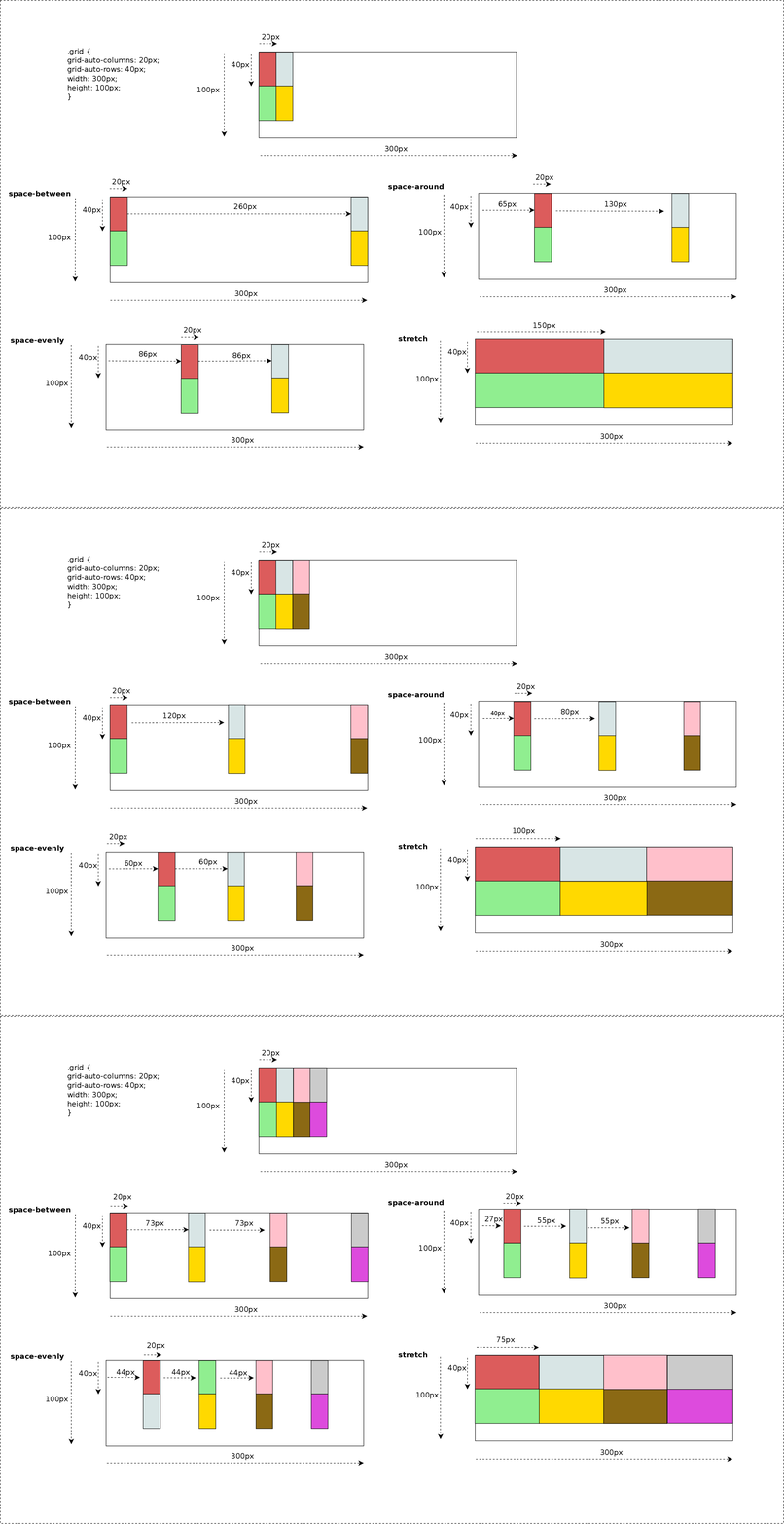
Picture below describes how these values would behave depending on the number of grid tracks; for simplicity I only use justify-content property, so tracks are distributed along the inline (row) axis. In next examples we will see how both properties work together using more complex grid definitions.

content-distribution-1
Effect of different Content Distribution values on Grid Layout. Click on the Image to evaluate the behavior when using different number of tracks.

Previous examples were defined with grid items filling grid areas of just 1×1 tracks, which makes distribution pretty simple and easier to predict. But thanks to the flexibility of Grid Layout syntax we can define irregular grids, for instance, using the grid-template-areas property like in the next example.

align-content-and span-4
Basic example of how to apply the different values and its effect on irregular grid design.

Since Content Distribution alignment considers grid tracks as the alignment subject, distributing tracks along the available space may have the consequence of modifying the dimensions of grid-areas defined by more than one track. The following picture shows the result of the code above and provides and excellent example of how powerful is the Content Alignment effect on a Grid Layout.

These use cases can be obtained from Igalia’s Grid Layout examples repository, so anybody can play with different grid designs and alignment values combinations. They are also available at our codepen repository.

Grid Layout behind the scene

Now I’d like to explain a bit what I had to implement in the browser’s webcore to get these new features done; just some small pieces of source code, the ones I considered better, to get an idea of what implementing new behavior in browsers implies.

As you might already know because of my previous posts, CSS Box Alignment specification was born to generalize Flexbox’s alignment behavior so that it can be used for grid and even regular blocks. Several new properties were added, like justify-items and justify-self, and CSS syntax has changed considerably. Specially noteworthy how Content Distribution alignment properties have changed from their initial Flexbox definition. They now support complex values like ‘space-between true’, ‘space-around start’, or even ‘stretch center safe’. This makes possible to express more info than using the previous simple keyword form, although it requires a new CSS parsing logic in Browsers.

More complex CSS parsing

Since both align-content and justify-content properties accept multiple optional keywords I needed to re-implement completely their parsing logic. I’m happy to announce that it recently landed WebKit’s trunk too, so now both web engines support the new CSS syntax.

Due to the complex values defined for theses CSS properties, a new CSSValue derived class was defined to hold all the Content Alignment data, named as CSSContentDistributionValue. This data is then converted to something meaningful for the style logic using the StyleBuilderConverter class. This is the preferred method in both WebKit and Blink engines, which it just needs to be declared in the CSSPropertyNames.in and CSSProperties.in template files, respectively.

align-content initial=initialContentAlignment, converter=convertContentAlignmentData
justify-content initial=initialContentAlignment, converter=convertContentAlignmentData

The StyleBuildConverter logic is pretty simple thanks to these 2 new data structures, as it can be appreciated in the following excerpt of source code:

StyleContentAlignmentData StyleBuilderConverter::convertContentAlignmentData(StyleResolverState&amp;, CSSValue* value)
{
    StyleContentAlignmentData alignmentData = ComputedStyle::initialContentAlignment();
    CSSContentDistributionValue* contentValue = toCSSContentDistributionValue(value);
    if (contentValue->distribution()->getValueID() != CSSValueInvalid)
        alignmentData.setDistribution(*contentValue->;distribution());
    if (contentValue->position()->getValueID() != CSSValueInvalid)
        alignmentData.setPosition(*contentValue->;position());
    if (contentValue->overflow()->getValueID() != CSSValueInvalid)
        alignmentData.setOverflow(*contentValue->overflow());
    return alignmentData;
}

The StyleContentAlignmentData class was defined to simplify how we manage these complex values, so that we can handle properties as they had an atomic value. This approach allows a more efficient and robust way of detecting and managing style changes in these properties.

New Layout operations

Once this new CSS syntax is correctly parsed and a LayoutStyle instance generated according to user defined CSS style rules, I needed to modify Flexbox’s layout code for adapting it to the new data structures, ensuring browser backward compatibility and passing all the Layout and Unit tests. I implemented from scratch this logic for Grid Layout so I had the opportunity to introduce several performance optimizations to avoid unnecessary layouts and repaints. This area is pretty interesting and I’ll talk about it soon in a new post.

One interesting aspect of Content Distribution alignment is that it might take part in the track sizing algorithm. As it was explained in my previous post about Self Alignment, stretch value increases alignment subject’s size to fill its alignment container’s available space. This is also the case of Content Alignment, but considering tracks as alignment subject. However, there is another case not so obvious where <content-distribution> values may influence in track sizing resolution, or perhaps better said, grid area sizing.

Let’s consider this example of grid where there are certain areas using more than one track:

grid-template-areas: "a a b"
                     "c d b"
grid-auto-columns: 20px;
grid-auto-rows: 40px;
width: 150px;
height: 300px;

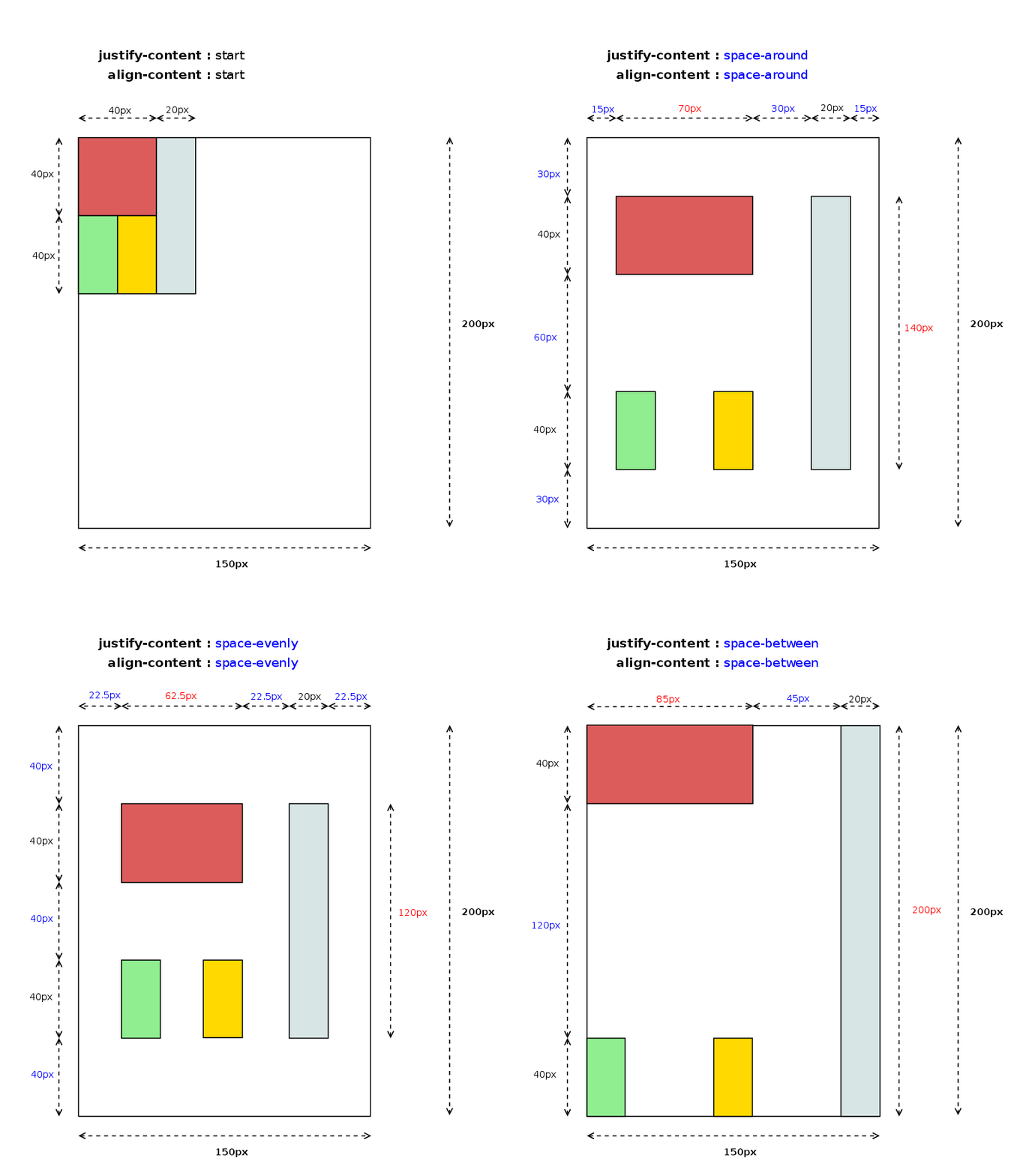
The example above defines a grid with 3 column tracks of 20px and 2 row tracks of 40px, which would be laid out as it’s shown in the following diagram:

content-distribution-spans
Grid Layout with areas filing more than one track. Click on the picture to evaluate the effect of each value on the grid area size.

This fact has interesting implementation implications due to the fact that in certain cases, in order to determine grid item’s logical height we need its logical width to be resolved first. Track sizing algorithm uses children grid area size to determine grid cell’s logical height, hence given that alignment logic needs track sizes have been already resolved, it may imply a re-layout of the grid items which size could be affected by the used content-distribution value. The following source code shows how I handle this scenario:

LayoutUnit LayoutGrid::gridAreaBreadthForChild(const LayoutBox& child, GridTrackSizingDirection direction, const Vector& tracks) const
{
    const GridCoordinate& coordinate = cachedGridCoordinate(child);
    const GridSpan& span = (direction == ForColumns) ? coordinate.columns : coordinate.rows;
    const Vector& trackPositions = (direction == ForColumns) ? m_columnPositions : m_rowPositions;
    if (span.resolvedFinalPosition.toInt() < trackPositions.size()) {
        LayoutUnit startOftrack = trackPositions[span.resolvedInitialPosition.toInt()];
        LayoutUnit endOfTrack = trackPositions[span.resolvedFinalPosition.toInt()];
        return endOfTrack - startOftrack + tracks[span.resolvedFinalPosition.toInt()].baseSize();
    }
    LayoutUnit gridAreaBreadth = 0;
    for (GridSpan::iterator trackPosition = span.begin(); trackPosition != span.end(); ++trackPosition)
        gridAreaBreadth += tracks[trackPosition.toInt()].baseSize();
 
    return gridAreaBreadth;

The code above will return different results, in the cases mentioned before, depending on whether it’s run during track sizing alignment or after applying the alignment logic. This will likely make needed a new layout of the whole grid, or at least, the affected grid items, which it likely has a negative impact on performance.

Current status and next steps

I’d like to finish this post with a snapshot of current situation and challenges for the next months, as I’ve been regularly doing in my last posts.

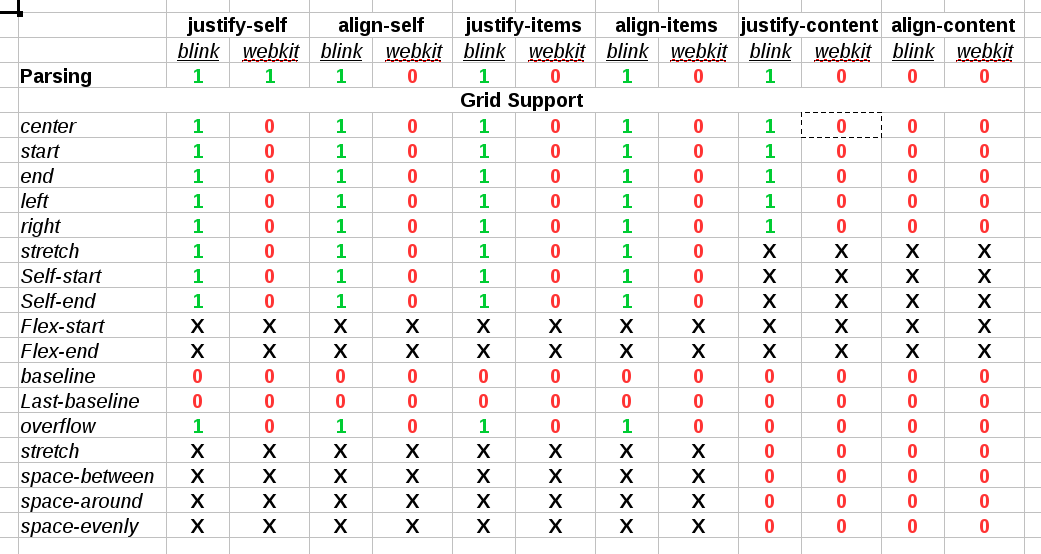
Unlike last reports, this time I’ve got good news regarding reduction of implementation gaps between the two web engines we are focusing our efforts on, WebKit and Blink. The following table describes current situation:

alignment-status

The table above indicates that several milestones were reached since the last report, although there are still some pending issues:

  • I’ve completed the implementation in WebKit of the parsing logic for the new Box Alignment properties: align-items and align-self.
  • As a side effect, I’ve also upgraded the ones already present because of Flexbox to the latest CSS3 Box Alignment specification.
  • WebKit has now full support for Default and Self Alignment fro Grid Layout, including also overflow handling
  • Blink has now full support for Content Distribution alignment, which missed <content-distrbuton> values.
  • WebKit’s Grid Layout implementation still misses support for Content Distribution alignment.
  • Baseline Alignment is still missing in both web engines

In addition to the above mentioned pending issues, our roadmap include the following tasks as part of my todo list for the next months:

  • Even though there s support for different writing-modes and flow directions, there are still some issues with orthogonal flows. I’ve got already some promising patches but they still have to be reviewed by Blink and WebKit engineers.
  • Optimizations of style and repaint invalidations triggered by changes on the alignment properties. As commented before, this is a very interesting topic involving, which I’ll elaborate further in next posts.
  • Performance analysis of relevant Grid Layout use cases, which hopefully will lead to optimizations proposals.

All this work and many other contributions to Grid Layout for WebKit and Blink web engines are the result of the collaboration between Bloomberg and Igalia to implement this W3C specification.

Igalia & Bloomberg logos

Content Distribution in CSS Grid Layout

It’s been a while since Igalia and Bloomberg started to implement the Box Alignment specification for the CSS Grid Layout model. Some weeks ago we accomplished an important milestone of our roadmap landing in Blink trunk the last patches implementing the Content Distribution properties: align-content and justify-content.

Quoting the CSS Box Alignment document, the content distribution properties are defined as follows:

Aligns the contents of the box as a whole along the box’s inline/row/main axis.
The alignment container is the grid container’s content box. The alignment subjects are the grid tracks.

The CSS syntax of these recently added properties gives an idea of how powerful and flexible they are for grid layout definitions, allowing every possible alignment values combination:

auto | <baseline-position> | <content-distribution> || [ <overflow-position>? && <content-position> ]

It’s worth mentioning that Baseline Alignment is still not implemented, as well as the <content-distribution> values for Distribution Alignment. However, in the latter case I’ve got already a quite promising draft implementation which, eventually, has been very useful to activate a discussion inside the W3C community to allow these alignment values for grid. In previous versions of the specification it was stated that all <content-distribution> values should use their <content-position> fallback values for grid containers. I’m glad that such decision was finally made, because I think that <content-distribution> values are really useful for defining fancier grid layouts. I’ll talk about this soon in a new post, as I consider it deserves a detailed description with the proper examples.

Last, but not least, as it happens with Self Alignment it allows using overflow keywords to define how we want to handle grid’s content overflow. It works in the same way for Content Distribution as we’ll see later with some examples.

Aligning the grid

When there is available space in the grid container block, it’s always useful to have a way to control how we want to use such space and how we want our grid to behave on it. It might happen that container’s size changes (fullscreen mode) or we could have to deal with a content sized grid modifying its content’s size. There are quite many possibilities, so I’ll leave this issue for user/designer’s imagination and I’ll focus on very simple examples to illustrate the concept.

For now, let’s consider this case to understand what you can do with the different <content-alignment> values in a grid layout.

.grid {
    grid: 50px 50px / 100px 100px;
    position: relative;
    width: 200px;
    height: 300px;
}
.fixedSize {
    width: 20px;
    height: 40px;
}
<div class="grid">
   <div class="fixedSize" style="grid-column: 1; grid-row: 1; background: violet;"></div>
   <div style="grid-column: 1; grid-row: 2; background: yellow;"></div>
   <div style="grid-column: 2; grid-row: 1; background: green;"></div>
   <div class="fixedSize" style="grid-column: 2; grid-row: 2; background: red;"></div>
</div>

We are defining a 2×2 grid with 50×100 pixels cells where we are going to place 4 items, one in each cell. Notice that items at (1,1) and (2,2) have a fixed size of 20×40 pixels, while the other 2 are auto-sized so they will be stretched to fill their corresponding grid cell (if you don’t know why, a reading of previous post might help). Also, bear in mind that both align-content and justify-content properties have start as the initial value for grids.

ContentAlignment

Controlling the grid overflow

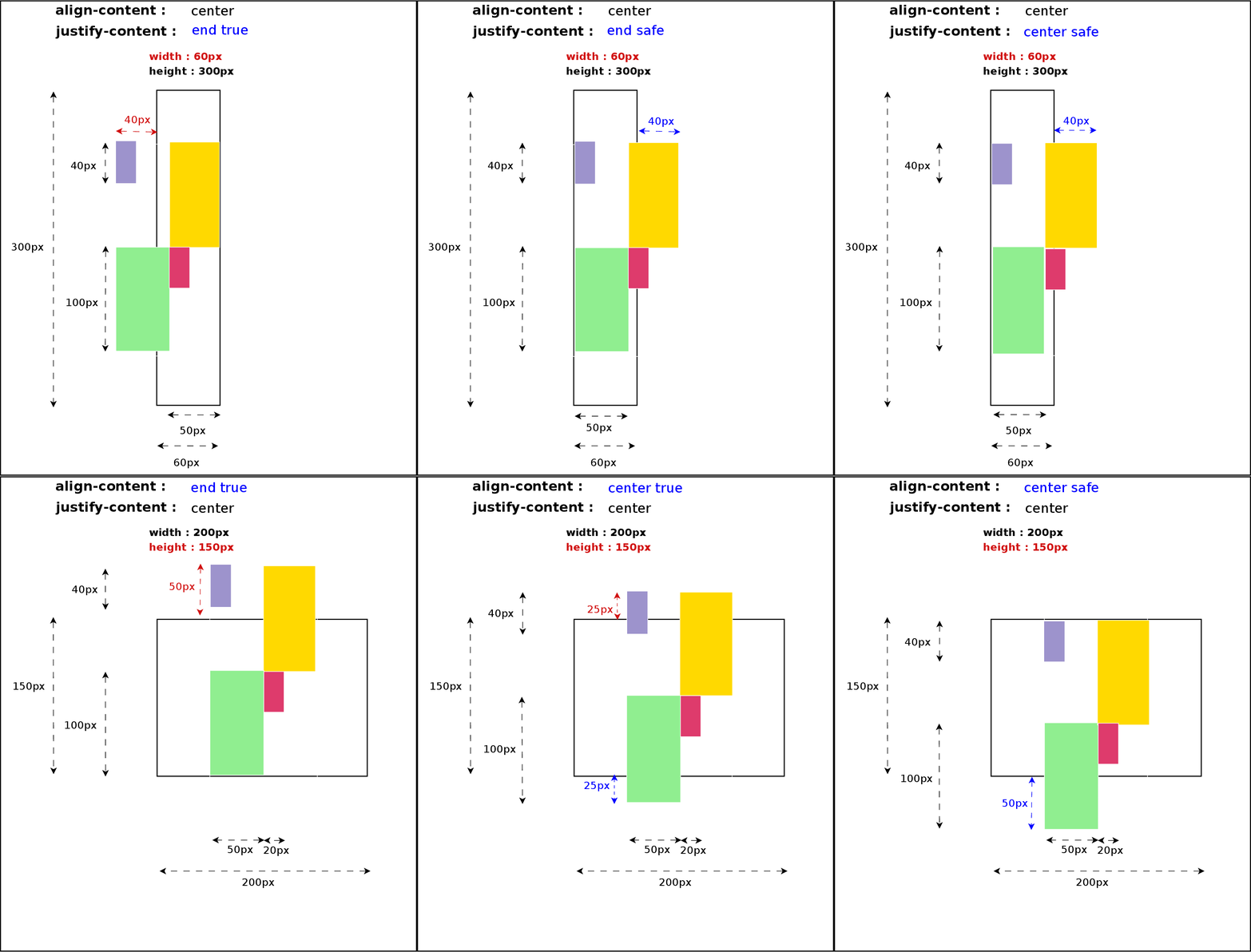
When grid content’s size exceeds its container dimensions there is the risk of data loss. Some examples of this scenario are center or end alignment from the viewport’s edges; all the content overflowing the viewport’s area can’t be reached, hence we lose such data. In order to prevent this issue Box Alignment specification defines the safe overflow mode, which basically forces a start alignment value for the property handling the dimension where the overflow is detected.

Using the same CSS and HTML code in the example above, we can easily define cases where this data loss issue (red colored arrows) is clearly noticeable just modifying the height or width to cause top or left overflow respectively.

Content-Alignment-Overflow1

There are other situations where Content Alignment and Overflow interact in a different way, using margins, padding or/and borders and even combining different writing-modes and flow directions. The effect of the alignment values varies considerably depending on those factors but I think you have now a clear idea of how to use these new properties in a grid layout.

Current status and next steps

With the grid support for the align-content and justify-content CSS properties in Blink we’ve got most of the Box Alignment specification covered. As it was commented before, just Base Alignment is still pending to be implemented in Chromium browsers. I have to admit that there are also some bugs and wrong behavior using certain CSS combinations, specially regarding orthogonal flows, but we are working on it right now and I hope to integrate the patches soon in trunk.

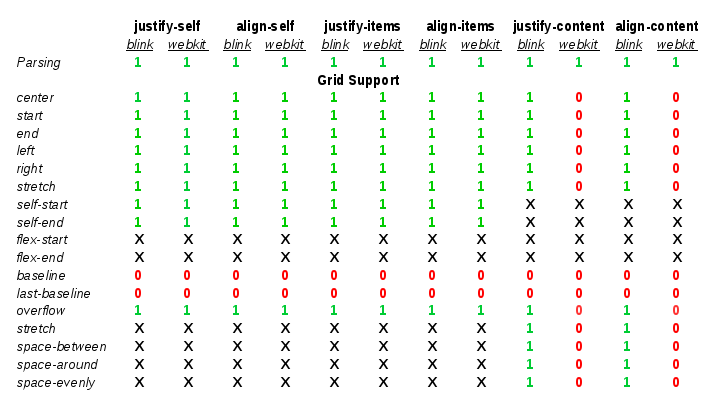
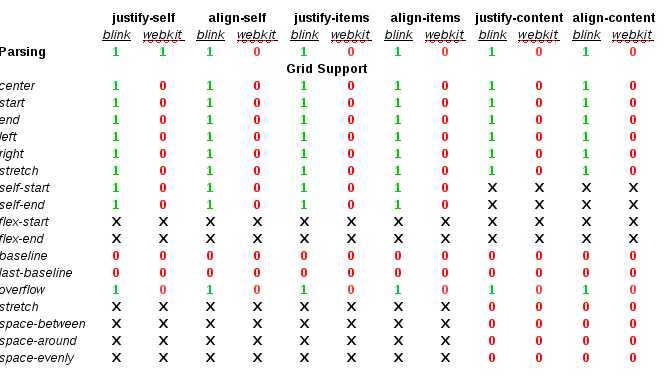
For the time being, let’s consider the following table as the current implementation status of the Box Alignment specification for the Grid Layout model in WebKit (Safari/Epiphany) and Blink (Chrome/Chromium/Opera) based browsers:

align-grid-support-1

The lack of progress in the implementation of the Box Alignment specification in the WebKit web engine is disappointing. I’ve been stuck for quite a lot of time trying to upgrade the CSS properties to the last version of the spec, mainly due design and performance issues. I’ll discuss with the WebKit hackers the best approach to solve this issue so I can put the Grid Layout implementation at the same level than in Blink web engine.

Igalia and Bloomberg will continue working on the implementation of the CSS Grid Layout specification and among my short/mid term challenges are completing the Box Alignment support. These goals include the following tasks:

  • Fixing bugs and completing the orthogonal flows support.
  • Implementing the Base Alignment features
  • Completing the Content Distribution Alignment with the <content-distribution> values
  • Implementing the Box Alignment spec in WebKit
Igalia & Bloomberg logos

Igalia and Bloomberg working to build a better web platform

Box Alignment and Grid Layout (II)

Some time has passed since my first post about the Box Alignment spec implementation status for Blink and WebKit web engines. I’ll do an update in this post and, since the gap between both web engines has grown considerably (I’ll do my best to reduce it as soon as possible), I’ll remark the differences between both engines.

What’s new ?

The ‘stretch’ value is now implemented for align-{self, items} and justify-{self, items} CSS properties. This behavior is quite important because it’s the default for these four properties in Flexible Box and Grid layouts. According to the specification, the ‘stretch’ value is defined as follows:

If the width or height (as appropriate) of the alignment subject is auto, its used value is the length necessary to make the alignment subject’s outer size as close to the size of the alignment container as possible, while still respecting the constraints imposed by min-height/max-width/etc. Otherwise, this is equivalent to start.

When defining the alignment properties in a grid layout it’s very important to consider how we want to manage item’s overflow. It’s allowed to specify an overflow alignment value for both Content and Item Alignment definition, but so far it’s implemented only for the Item Alignment properties. The Overflow Alignment concept is defined in the specification as follows:

To help combat undesirable data loss, an overflow alignment mode can be explicitly specified. “True” alignment honors the specified alignment mode in overflow situations, even if it causes data loss, while “safe” alignment changes the alignment mode in overflow situations in an attempt to avoid data loss.

The ‘stretch’ value in Grid Layout

This value applies to the Self Alignment properties {align, justify}-self, and obviously their corresponding Default Alignment ones {align, justify}-items. For grids, these properties consider that the alignment container is the grid cell, while the alignment subject is the grid item’s margin box.

The Box Alignment specification states that Default Alignment ‘auto’ values should be resolved to ‘stretch’ in case of Grid containers; this value will be used as the resolved value for ‘auto’ Self Alignment values.

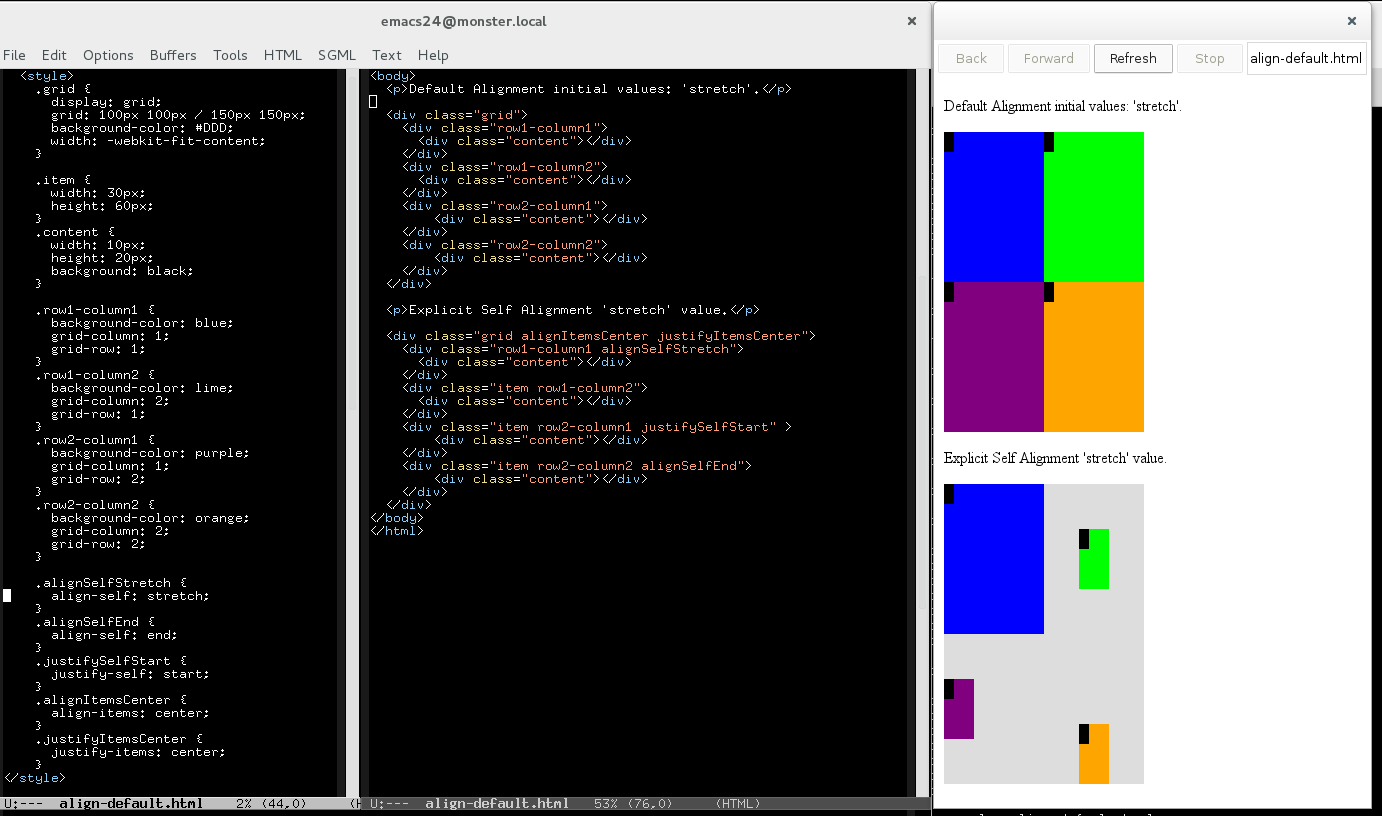
So by default, or when explicitly defined as ‘stretch’, the grid item’s margin box will be stretched to fill its grid cell breadth. Let’s see it with a basic example:

align-stretch
All the examples available at http://igalia.github.io/css-grid-layout/

This change affected only the layout codebase of the web engine, since the value was already introduced in the style parsing logic. The Grid Layout rendering logic uses an interesting abstraction to override the grid item’s block container. This abstraction allows us to use Grid Cells as block containers when computing the logical height and width.

Overflow Alignment in Grid Layout

The Overflow Alignment value used when defining a grid layout could be particularly useful, specially for fixed sized grids. The potential data lost may happen not only at the left and top box edges, but between adjoining grid cells. Overflow Alignment is defined via the ‘safe’ and ‘true’ keywords. They were already introduced in the Blink core’s style parsing logic as part of the CSS3 upgrade of the alignment properties (justify-self, align-self) used in the FlexBox implementation. The new CSS syntax is described by the following expression:

auto | stretch | <baseline-position> | [ <item-position> && <overflow-position>? ]

According to the current Box Alignment specification draft, the Overflow Alignment keywords have the following meaning:

  • safe: If the size of the alignment subject overflows the alignment container, the alignment subject is instead aligned as if the alignment mode were start.
  • true: Regardless of the relative sizes of the alignment subject and alignment container, the given alignment value is honored.

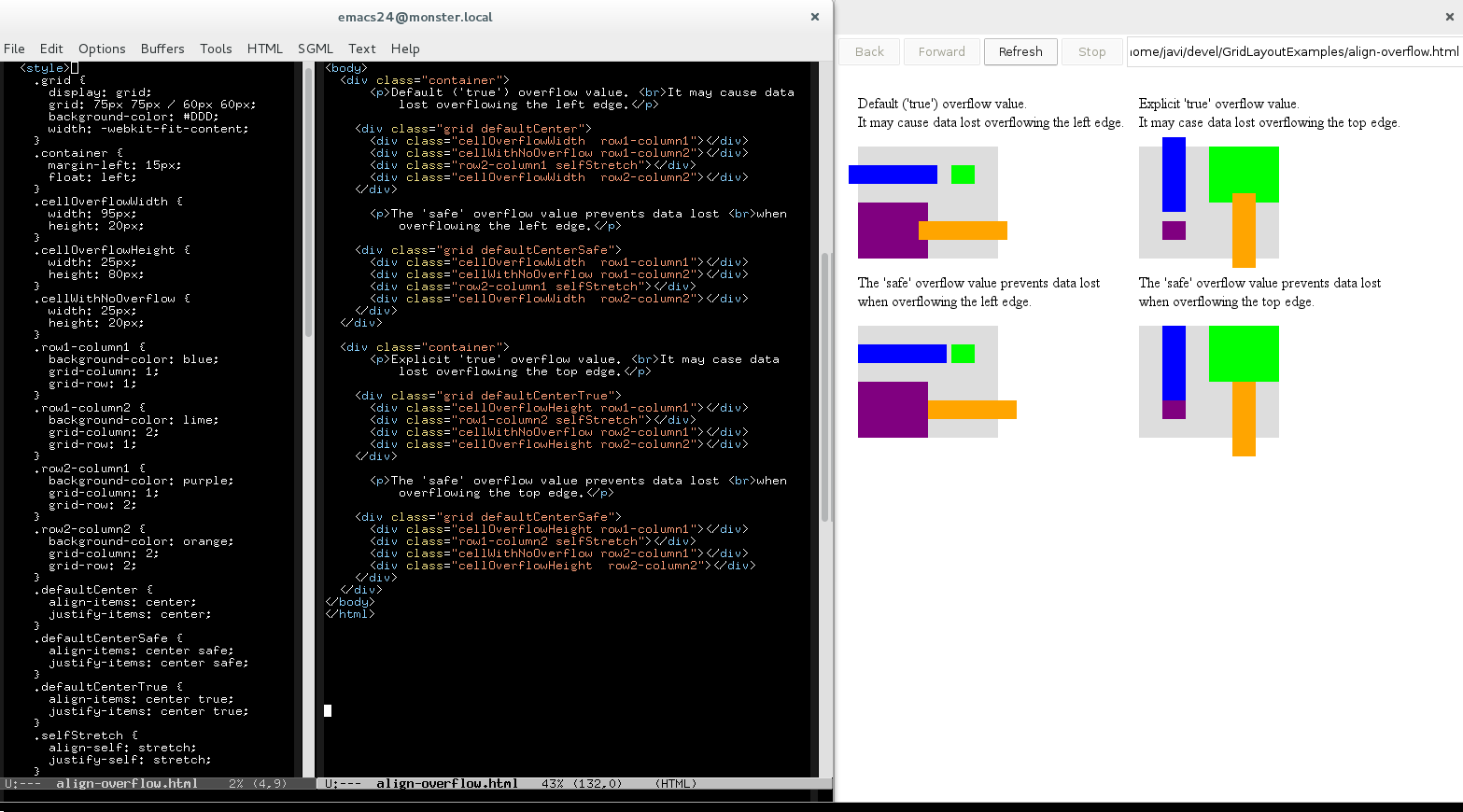
I’ll proceed now to show how Overflow Alignment is applied in the Grid Layout specification with an example:

align-overflow
All the examples available at http://igalia.github.io/css-grid-layout/

The new syntax to allow the Overflow Alignment keywords required to modify the style builder and parsing logic, as it was mentioned before. The alignment properties became a CSSValueList instance instead of simple keyword IDs; both Blink and WebKit provides Style Builder code generation directives (CSSPropertyNames.in) for simple properties, but this was not the case for these properties anymore.

The Style Builder is more complex now because it has to deal with the conditional overflow keyword, which can be specified before or after the <item-position> keyword. Blink provides a function template scheme for groups of properties sharing the same logic, which is the case of most of the CSS Box Alignment properties (align-self, align-items and justify-self; justify-items is slightly different so it needs custom functions). WebKit is currently defining the new style builder and it does not follow this approach yet, but I’d say it will, eventually, since it makes a lot of sense.

{% macro apply_alignment(property_id, alignment_type) %}
{% set property = properties[property_id] %}
{{declare_initial_function(property_id)}}
{
    state.style()->set{{alignment_type}}(RenderStyle::initial{{alignment_type}}());
    state.style()->set{{alignment_type}}OverflowAlignment(RenderStyle::initial{{alignment_type}}OverflowAlignment());
}
 
{{declare_inherit_function(property_id)}}
{
    state.style()->set{{alignment_type}}(state.parentStyle()->{{property.getter}}());
    state.style()->set{{alignment_type}}OverflowAlignment(state.parentStyle()->{{property.getter}}OverflowAlignment());
}
 
{{declare_value_function(property_id)}}
{
    CSSPrimitiveValue* primitiveValue = toCSSPrimitiveValue(value);
    if (Pair* pairValue = primitiveValue->getPairValue()) {
        state.style()->set{{alignment_type}}(*pairValue->first());
        state.style()->set{{alignment_type}}OverflowAlignment(*pairValue->second());
    } else {
        state.style()->set{{alignment_type}}(*primitiveValue);
    }
}
{% endmacro %}
{{apply_alignment('CSSPropertyJustifySelf', 'JustifySelf')}}
{{apply_alignment('CSSPropertyAlignItems', 'AlignItems')}}
{{apply_alignment('CSSPropertyAlignSelf', 'AlignSelf')}}

Even though style building and parsing is shared among all the layout models using the Box Alignment properties, like Flexible Box and Grid so far, Overflow Alignment is only supported so far by the CSS Grid Layout implementation. The Overflow Alignment logic affects how the grid items are positioned during the layout phase.

The Overflow Alignment keywords are also valid in the Content Distribution syntax, which I’m working on now with quite good progress. The first patches landed already in trunk, providing an implementation of the justify-content property in Grid Layout. I’ll talk about it soon, hopefully, once the implementation is completed and the discussion in the www-style mailing list conclude with some agreement regarding the Distributed Alignment for grids.

Current implementation status

The Box Alignment specification is quite complete now in Blink, unfortunately that’s not the case of WebKit. I’ll summarize now the current implementation status in browsers based on each web engine, which are basically Chrome/Chromium vs Safari; I’ll also try to outline the roadmap for the next weeks.

align-grid-support

The flex-start, and flex-end values are used only in Flexible Box layouts, so they don’t apply to this analysis of the Grid support of the Box Alignment spec. The Distributed Alignment values apply only to the Content Distribution properties (align-content and justify-content). Finally, ‘stretch‘ is a valid value for both, Positional and Distributed Alignment, so it’s not redundant but a different interpretation of the same value depending on the property it’s applied to.

Some conclusions we can extract from the table above:

  • Default and Self Alignment support is almost complete in Blink; only Baseline Alignment is pending to be implemented.
  • Content Distribution support for justify-content in Blink. Only <content-position> values are implemented, since current spec draft states that all the <content-distibution> values will fallback in Grid Layout; spec authors are still evaluating changes on this issue, though.
  • WebKit fails to provide CSS3 parsing for all the properties except justify-self, although there are some patches pending of review to improve this situation.
  • There is no Grid support at all in WebKit for any of the Box Alignment properties.
Igalia & Bloomberg logos

Igalia and Bloomberg working to build a better web platform