Here’s a tip for those of you using an N900 with an English keyboard.
For those who don’t know it, this is how arrow keys are arranged in (some) non-English layouts:
 |
Compare to the English layout:
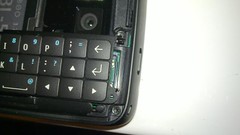 |
My N900 has an English keyboard, and I like it because I use the X terminal a lot so having separate keys for the arrows is good.
However I miss the accents (in particular ‘ and ~) as I usually write in Portuguese and Spanish, and using the additional on-screen keyboard is not that convenient for a Jabber conversation.
Fortunately, arrow keys can be re-mapped to add extra symbols by editing this file:
/usr/share/X11/xkb/symbols/nokia_vndr/rx-51
Just go to the end of the file and replace the ‘arrows_4btns‘ entry with this:
xkb_symbols "arrows_4btns" {
key <UP> { type[Group1] = "PC_FN_LEVEL2", symbols[Group1] = [ Up, dead_circumflex ] };
key <LEFT> { type[Group1] = "PC_FN_LEVEL2", symbols[Group1] = [ Left, dead_acute ] };
key <DOWN> { type[Group1] = "PC_FN_LEVEL2", symbols[Group1] = [ Down, dead_tilde ] };
key <RGHT> { type[Group1] = "PC_FN_LEVEL2", symbols[Group1] = [ Right, dead_grave ] };
};
With this, Fn+Up/Down/Left/Right will produce a dead circumflex/tilde/acute accent/grave accent.
If you want these changes to take effect immediately just type ‘setxkbmap us‘.
Hope you find it useful.
Update 19 Dec 2009. Since some people have asked: of course even if you only write in English or another language that doesn’t need accents, you can still add useful symbols to the arrow keys such as ‘|‘, ‘<‘ or ‘>‘. You can use any of these keyboard layouts as an example. See also this thread and this other one.
Update 10 Jan 2010. The information on this post is now (in expanded form) in the Maemo wiki.
Very nice tip 🙂
Here are some for German Umlauts:
xkb_symbols “arrows_4btns” {
// standard arrows mapping
// normal 2nd level must not be enumerated to allow text selection with Shift key
key { type[Group1] = “PC_FN_LEVEL2”, symbols[Group1] = [ Up, udiaeresis ] };
key { type[Group1] = “PC_FN_LEVEL2”, symbols[Group1] = [ Left, odiaeresis ] };
key { type[Group1] = “PC_FN_LEVEL2”, symbols[Group1] = [ Down, adiaeresis ] };
key { type[Group1] = “PC_FN_LEVEL2”, symbols[Group1] = [ Right, ssharp ] };
};
I would like to recommend the following, which maps Home/End/Page Up/Page Down to their logical movement counterparts:
partial hidden alphanumeric_keys
xkb_symbols “arrows_4btns” {
// standard arrows mapping
// normal 2nd level must not be enumerated to allow text selection with Shift key
key { type[Group1] = “PC_FN_LEVEL2”, symbols[Group1] = [ Up, Page_Up ] };
key { type[Group1] = “PC_FN_LEVEL2”, symbols[Group1] = [ Left, Home ] };
key { type[Group1] = “PC_FN_LEVEL2”, symbols[Group1] = [ Down, Page_Down ] };
key { type[Group1] = “PC_FN_LEVEL2”, symbols[Group1] = [ Right, End ] };
};
Thank you for the tip! àáèéìíòóùú and so on…
wow this tip is what i waited for many thx crown77
Hi again sorry i was a little too far, could somebody give a hint how to activate the arrow keys in the german n900 device version so the up and down working without fn like in the usa and uk version? i would need this to play with the emus.
thx again crown77
In the spanish version of n900 you can change the layout ot the keyboard to english in settings, text input, desing of phisical keyboard
Pingback: Tweets that mention The world won’t listen » Remapping the N900 arrow keys -- Topsy.com
Does anybody know the key name to find the next or previous white space? I’d like to map ctrl + (left | right) to be the next word or previous work, like keys “W” and “B” do while in vi command mode.
speednut: Ctrl+Left/Right works that way by default 🙂
Pingback: Pinguins Móveis » Blog Archive » Pinguins soltos
@berto: On my US spec N900 with a doc loaded in Notes, the Ctrl+Left/Right does the same thing as Left/Right. Using the Ctrl key makes no difference.
Can you share the default setting on yours?
Pingback: mikko’s log » Blog Archive » N900 Scandinavic Letters from US keyboard
speednut: I’ve just tried again right after reflashing with the notes app. It works fine, you can jump between words with Ctrl+Left/Right
@berto: I pulled my head out of my bumm and it works as you’ve stated. Thanks for being patient with me. 🙂
Pingback: smoku: Jak przemapować klawisze w #N900 - blogs.igalia.com/ otagowany n900 | flaker.pl
Pingback: Using the Shavian alphabet on the N900 « ᛏᚦ
Pingback: Using the Shavian alphabet on the N900 | Maemo Nokia N900
Thanks for the tip, this makes the N900 a lot more usable to me. Now there’s also a kind of firefox which runs on the N900, so I don’t think I need my iPhone anymore 🙂
Pingback: Mapeando acentos e cedilha no Nokia N900 com teclado US | rodrigostoledo.com
I have long searched for a solution here and now found. Thanks for this useful tip. I love my N900
Nice Post. Thank you for this nice Tip
Very nice post – It’s really helpful for my N900!
I hope i get’s more usable in the future 😉
Hi again sorry i was a little too far, could somebody give a hint how to activate the arrow keys in the german n900 device version so the up and down working without fn like in the usa and uk version? i would need this to play with the emus.
This is a great blog. Thank you very much for the information of remapping the N900 arrow keys. This helped me very much with my mobile phone. Best regards
Thanks for that noce review that really helped me making an decision what to buy. It is great to have volunteers like you that that offer this service for free and post their results into the internet. thnaks a lot and go on!
hello, i got an englisch keyboard, and i want to put up the umlauts on the arrow keys.
but when type “/usr/share/X11/xkb/symbols/nokia_vndr/rx-51” in the x-terminal, it says “/usr/share/X11/xkb/symbols/nokia_vndr/rx-51: Permission denied”
WHY?
You have to EDIT that file with a text editor
omg.. HOW?! can you put here a tutorial or something for stupid people?
i mean, i have no idea where to find the file, i know nothing…
Thanks for this Topic, but how can activate the arrow keys in the german n900 device version?
Great tip, I really needed the help with my N900.
Very good article. But this did not work on german devices. If someone knows how to do this, it would be nice if he could post a short hint.
Thank you for the great tip. Can anybody say how I get that working on a german N900? Greetings from germany! 🙂
Thx for the solution, I’m looking for such a great tip a longer time. N900 is now outdated, but I love it anyway.
Hi again sorry i was a little too far, could somebody give a hint how to activate the arrow keys in the german n900 device version so the up and down working without fn like in the usa and uk version?..
nikon scopes