Extension Migration Progress Update – Part 2

This post walks through the process of bringing back an extension-focused //extensions/shell in Chromium and enabling the “Add to Chrome” button on the Chrome Web Store.

If you haven’t read it yet, I recommend starting with Extension Migration Progress Update – Part 1, where I described the initial stage of migrating extension installation formats and APIs out of the //chrome layer.

After migrating the extension installation formats — CRX, ZIP, and Unpacked — into the //extensions layer, the next natural step was to enable embedders to install extensions directly from the Chrome Web Store.

To achieve this, the Web Store Private APIs were an essential piece of the puzzle.

Migrating Web Store Private APIs

The Web Store Private APIs had a relatively large dependency on //chrome. We started by migrating the relevant files and gradually replacing Chrome-specific dependencies with alternative implementations where necessary.

In some cases, this meant introducing new interfaces, while in others it meant moving code to a more appropriate layer.

After working through these dependencies, the final changes were eventually landed upstream: Chromium CL – Web Store Private API migration.

The changes are included in M152.

However, after this migration was completed, we encountered an unexpected obstacle.

Where did extensions/shell go?

Chromium originally had a lightweight embedder called //extensions/shell, previously built as the app_shell target.

The idea was simple: provide an environment where extensions could be installed and run without bringing up the entire Chrome browser.

However, the shell had originally been created about a decade ago for a different purpose. It was intended to provide an independent environment for ChromeOS platform applications without requiring the full Chrome browser.

Platform apps were eventually deprecated, and the shell was later repurposed primarily as a lightweight environment for extension browser tests.

Over time, the extension browser tests were moved into the //chrome layer. The shell was no longer used by any real product, and maintaining it became technical debt. As a result, app_shell was eventually removed upstream.

Why were the browser tests moved from //extensions to //chrome?

I asked an Extension owner about the reasoning behind this change.

The key point was that the old shell-based browser tests did not provide a sufficiently realistic environment for testing extensions.

There were two major problems.

First, many extension APIs delegate part of their implementation to the embedder through interfaces such as ExtensionsApiClient. Testing only the //extensions implementation with the shell meant that the actual embedding logic was not exercised. Bugs in the delegated implementation could therefore go unnoticed.

Second, extensions depend on much more than the //extensions layer itself. UI, networking, rendering, process management, and other browser functionality all affect how extensions behave. The //chrome layer provides an important part of that environment.

Therefore, the upstream direction was to move extension browser tests into the real Chrome browser environment rather than maintaining a separate shell.

That reasoning makes sense for testing.

In fact, we agreed that bringing the old shell back simply as a test environment would not be the right approach.

But I had a different question:

What if we use a lightweight shell not as a test environment, but as a reference implementation and a demo environment for embedders?

The answer was that Chromium currently does not plan to maintain such an embedder. The concern is that a simplified shell could itself become an inaccurate reference implementation. If its behavior diverged from the real Chrome integration, it could create more confusion rather than provide useful guidance.

The suggested direction was instead to use extension-based Web Platform Tests (WPT) to provide consistency, while considering actual browsers as the reference implementations.

That approach makes sense from the upstream perspective.

However, for our migration work, we still needed something slightly different.

We needed a small, working environment where we could demonstrate that extensions can actually be supported outside of the //chrome layer.

So we decided to bring back an extension-focused shell — not as an upstream testing framework, but as a practical environment for integration and demonstration.

Although this shell is not part of upstream Chromium, we are currently maintaining the implementation internally in the Igalia repository, with plans to open-source it in the future. It serves as a lightweight environment for demonstrating and validating Extension support outside of the //chrome layer, rather than as a replacement for Chromium’s browser tests or an upstream reference implementation.

Rebuilding the Extension Shell

The first step was to establish the basic structure of the shell.

1. Building the skeleton

We created a custom ShellBrowserContext directly derived from content::BrowserContext, bootstrapped the Views environment, and added a simple placeholder window.

On top of that, we connected the extension system through:

  • ShellExtensionsBrowserClient — the entry point for implementing embedder-specific Extensions behavior for the shell.
  • ShellExtensionSystem — the service responsible for core extension management, including loading and unloading extensions and parsing manifests.

This gave us the basic environment needed to initialize Chromium’s extension infrastructure without depending on the full Chrome browser.

2. Building the installation pipeline

Next, the shell needed to actually install extensions.

We connected ExtensionExternalInstaller, which orchestrates the overall installation flow — including downloading, unpacking, and manifest validation — to support CRX and ZIP installation.

We also implemented ShellContentUtilityClient, which registers the sandboxed utility-process service needed to safely handle untrusted data, such as ZIP decompression, out of process.

We then completed the renderer-side wiring so that an installed Manifest V3 extension could actually execute its service worker and access chrome-extension:// resources.

Several pieces of the extension installation infrastructure also needed to be connected, including:

  • Blocklist — a KeyedService that tracks which extensions are blocklisted, backed by Safe Browsing.
  • InstallStageTracker — tracks installation stages and failure events specifically for policy force-installed extensions.
  • InstallTracker — broadcasts installation start, completion, and failure events to observers.
  • InstallVerifier — confirms that an installed extension is either verified through a Web Store signature or allowlisted by enterprise policy.
  • SharedModuleService — supports the import/export mechanism that extensions use to pull in shared modules from other extensions.

At this point, we had a shell that could actually install and initialize extensions.

3. Making it look like a browser

The next step was to make the shell usable as an actual browser rather than just an extension test environment.

We used the existing content/shell implementation and ShellPlatformDelegateViews as references, without directly depending on them.

The shell now has a basic browser UI with:

  • Back
  • Forward
  • Reload
  • Stop
  • Address bar
  • A views::WebView containing a real content::WebContents

This allowed us to browse normal web pages as well as run installed extensions.

4. Enforcing network-level policies

With the browser environment in place, we also started validating extension APIs that operate at the network level.

In particular, we tested declarativeNetRequest and webRequest, which uncovered a few issues that needed to be fixed in the shell integration.

After these steps, the basic foundation of an embedder that can install and run extensions was finally becoming stable.

And that naturally led to the next question:

Can we install an extension directly from the Chrome Web Store?

The answer was initially no.

Enabling the “Add to Chrome” Button

When opening an extension page on the Chrome Web Store, the “Add to Chrome” button was disabled.

The reason was another missing piece of Chrome-specific functionality.

The Web Store uses the chrome.webstorePrivate extension API to perform the installation flow.

Behind this API is WebstorePrivateAPIDelegate, which delegates browser-specific operations to the embedder. These operations include things such as installation approval, login state, Safe Browsing checks, and the installation confirmation UI.

Since our shell was not Chrome, these pieces were not implemented.

Implementing the missing pieces

To make the Web Store installation flow work, we implemented the required delegate functionality with safe defaults and added the necessary extension infrastructure to the shell.

This included:

  • WebstorePrivateAPIDelegate — provides the embedder-specific implementation required by the chrome.webstorePrivate API to handle Web Store extension installation.
  • ShellExtensionsAPIClient — provides shell-specific implementations of browser-level services required by extension APIs.
  • ShellExtensionInstallPromptClient — provides the shell-specific UI handling for extension installation prompts.
  • WebstorePrivateAPI factory — creates and provides the WebstorePrivateAPI service for extensions running in the shell.
  • ManagementAPI factory — creates and provides the ManagementAPI service, which exposes extension management functionality to extensions.

The shell also needed to provide appropriate User-Agent metadata, which was delegated through:

embedder_support::GetUserAgentMetadata().

After wiring these pieces together, the Chrome Web Store was finally able to recognize our shell as an environment capable of handling extension installation.

Demo

And this is where things became much more interesting.

The “Add to Chrome” button is now enabled, and clicking it can trigger the extension installation flow in our extension shell.

This is an important milestone for the migration.

We now have a lightweight browser environment that can:

  1. Launch independently of Chrome.
  2. Browse normal web pages.
  3. Install extensions.
  4. Run Manifest V3 extensions.
  5. Exercise extension APIs.
  6. Install an extension directly from the Chrome Web Store.

What’s next?

Getting an extension installed is only part of the story.

The next step is making the installed extensions behave like they do in a real browser.

There are still several APIs that have traditionally depended on the //chrome layer. Permissions, cookies, and other browser integration points are among the areas that need to be migrated or provided by the embedder.

Once these pieces are migrated, we should be able to go beyond simply installing an extension from the Web Store and demonstrate a more complete end-to-end experience:

Chrome Web Store → Extension installation → Extension startup → Extension API usage

This is the next stage of the migration work.

I’ll continue documenting the progress as more of these APIs move into the //extensions layer and the extension shell becomes a more complete demonstration environment for embedders.
Extension Migration Progress Update – Part 1

Background

Following up on my previous post, I would like to share an update on the progress of the Extension migration work that has been underway over the past few months.

To briefly recap the motivation behind this effort: Igalia’s long-term goal is to enable embedders to use the Extension system without depending on the //chrome layer. In other words, we want to make it possible to support Extension functionality with minimal implementation effort using only //content + //extensions.

Currently, some parts of the Extension system still rely on the //chrome layer. Our objective is to remove those dependencies so that embedders can integrate Extension capabilities without needing to include the entire //chrome layer.

As a short-term milestone, we focused on migrating the Extension installation implementation from //chrome to //extensions. This phase of the work has now been completed, which is why I’m sharing this progress update.


Extension Installation Formats

Chromium supports several formats for installing Extensions. The most common ones are zip, unpacked and crx.

Each format serves a different purpose:

  • zip – commonly used for internal distribution or packaged deployment
  • unpacked – primarily used during development and debugging
  • crx – the standard packaged format used by the Chrome Web Store

During this migration effort, the code responsible for supporting all three installation formats has been successfully moved to the //extensions layer.

As a result, the Extension installation pipeline is now significantly less dependent on the //chrome layer, bringing us closer to enabling Extension support directly on top of //content + //extensions.

Patch and References

To support this migration, several patches were introduced to move installation-related components into the //extensions layer and decouple them from //chrome.

For readers who are interested in the implementation details, you can find the related changes and discussions here:

These links provide more insight into the design decisions, code changes, and ongoing discussions around the migration.


Demo

Below is a short demo showing the current setup in action.

This demo was recorded using app_shell on Linux, the minimal stripped-down browser container designed to run Chrome Apps and using only //content and //extensions/ layers.

To have this executable launcher, we also extended app_shell with the minimal functionality required for embedders to install the extension app.

This allows Extensions to be installed and executed without relying on the full Chrome browser implementation, making it easier to experiment with and validate the migration work.


Next Steps

The next short-term goal is to migrate the code required for installing Extensions via the Chrome Web Store into the //extensions layer as well.

At the moment, parts of the Web Store installation flow still depend on the //chrome layer. The next phase of this project will focus on removing those dependencies so that Web Store-based installation can also function within the //extensions layer.

Once this work is completed, embedders will be able to install Extension apps from Chrome WebStore with a significantly simpler architecture (//content + //extensions).

This will make the Extension platform more modular, reusable, and easier to integrate into custom Chromium-based products.

I will continue to share updates as the migration progresses.

Our Journey to support Extensions for embedders

A History of Extensions for Embedders — and Where We’re Heading

Chromium’s Extensions platform has long been a foundational part of the desktop browsing experience. Major Chromium-based browsers—such as Chrome and Microsoft Edge—ship with full support for the Chrome Extensions ecosystem, and user expectations around extension availability and compatibility continue to grow.

In contrast, some Chromium embedders— for instance, products built directly on the //content API without the full //chrome stack—do not naturally have access to Extensions. Similarly, the traditional Chrome for Android app does not support Extensions. While some embedders have attempted to enable limited Extensions functionality by pulling in selected pieces of the //chrome layer, this approach is heavyweight, difficult to maintain, and fundamentally incapable of delivering full feature parity.

At Igalia we have been willing to help on the long term-goal of making Extensions usable on lightweight, //content-based products, without requiring embedders to depend on //chrome. This post outlines the background of that effort, the phases of work so far, the architectural challenges involved, and where the project is headed.

Note: ChromeOS supporting extensions (ChromeOS has announced plans to incorporate more of the Android build stack) is not the same thing as Chrome-Android App supporting extensions. The two codepaths and platform constraints differ significantly. While the traditional Chrome app on Android phones and tablets still does not officially support extensions, recent beta builds of desktop-class Chrome on Android have begun to close this gap by enabling native extension installation and execution.

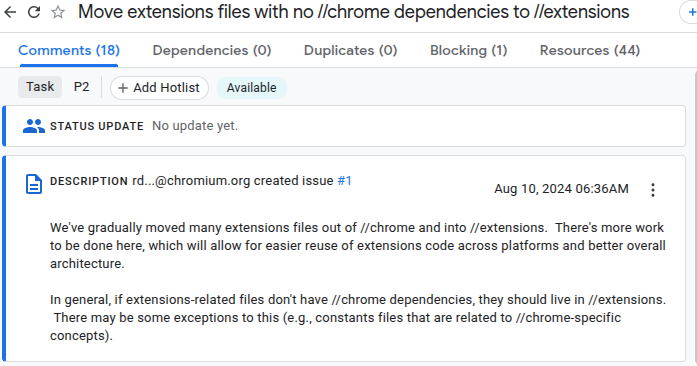
Tracking bug: https://issues.chromium.org/issues/356905053

Extensions Architecture — Layered View

The following diagram illustrates the architectural evolution of Extensions support for Chromium embedders.

Traditional Chromium Browser Stack

At the top of the stack, Chromium-based browsers such as Chrome and Edge rely on the full //chrome layer. Historically, the Extensions platform has lived deeply inside this layer, tightly coupled with Chrome-specific concepts such as Profile, browser windows, UI surfaces, and Chrome services.

+-----------------------+
|      //chrome         |
|  (UI, Browser, etc.)  |
+-----------------------+
|     //extensions      |
+-----------------------+
|      //content        |
+-----------------------+

This architecture works well for full browsers, but it is problematic for embedders. Products built directly on //content cannot reuse Extensions without pulling in a large portion of //chrome, leading to high integration and maintenance costs.


Phase 1 — Extensions on Android (Downstream Work)

In 2023, a downstream project at Igalia required extension support on a Chromium-based Android application. The scope was limited—we only needed to support a small number of specific extensions—so we implemented:

  • basic installation logic,
  • manifest handling,
  • extension launch/execution flows, and
  • a minimal subset of Extensions APIs that those extensions depended on.

This work demonstrated that Extensions can function in an Android environment. However, it also highlighted a major problem: modifying the Android //chrome codepath is expensive. Rebasing costs are high, upstream alignment is difficult, and the resulting solution is tightly coupled to Chrome-specific abstractions. The approach was viable only because the downstream requirements were narrow and controlled.

I shared this experience at BlinkOn Lightning Talk: “Extensions on Android”.


Phase 2 — Extensions for Embedders
( //content + //extensions + //components/extensions )

Following Phase 1, we began asking a broader question:

Can we provide a reusable, upstream-friendly Extensions implementation that works for embedders without pulling in the //chrome layer?

Motivation

Many embedders aim to remain as lightweight as possible. Requiring //chrome introduces unnecessary complexity, long build times, and ongoing maintenance costs. Our hypothesis was that large portions of the Extensions stack could be decoupled from Chrome and reused directly by content-based products.

One early idea was to componentize the Extensions code by migrating substantial parts of //chrome/*/extensions into //components/extensions.

+-------------------------+
| //components/extensions |
+-------------------------+
|      //extensions       |
+-------------------------+
|       //content         |
+-------------------------+

Proof-of-concept : Wolvic

We tested this idea through Wolvic , a VR browser used in several commercial
solutions. Wolvic has two implementations:

  • a Gecko-based version, and
  • a Chromium-based version built directly on the //content API.


Originally, Extensions were already supported in Wolvic-Gecko, but not in Wolvic-Chromium. To close that gap, we migrated core pieces of the Extensions machinery into //components/extensions and enabled extension loading and execution in a content-only environment.

By early 2025, this work successfully demonstrated that Extensions could run without the //chrome layer.

Demo video::
https://youtube.com/shorts/JmQnpC-lxR8?si=Xf0uB6q__j4pmlSj

Design document:
https://docs.google.com/document/d/1I5p4B0XpypR7inPqq1ZnGMP4k-IGeOpKGvCFS0EDWHk/edit?usp=sharing

However, this work lived entirely in the Wolvic repository, which is a fork of Chromium. While open source, this meant that other embedders could not easily benefit without additional rebasing and integration work.

This raised an important question:

Why not do this work directly in the Chromium upstream so that all embedders can benefit?


Phase 3 — Extensions for Embedders
(//content + //extensions)

Following discussions with the Extensions owner (rdevlin.cronin@chromium.org), we refined the approach further.

Rather than migrating functionality into //components, the preferred long-term direction is to move Extensions logic directly into the //extensions layer wherever possible.

+-----------------------+
|      Embedder UI      | (minimal interfaces)
+-----------------------+
|      //extensions     |
+-----------------------+
|       //content       |
+-----------------------+

This approach offers several advantages:

  • clearer layering and ownership,
  • fewer architectural violations,
  • reduced duplication between Chrome and embedders,
  • a cleaner API surface for integration.

We aligned on this direction and began upstream work accordingly.

Tracking bug: 🔗 https://issues.chromium.org/issues/358567092

Our goals for Content Shell + //extensions are:

  1. Embedders should only implement a small set of interfaces, primarily for UI surfaces (install prompts, permission dialogs) and optional behaviors.
  2. Full Web Extensions APIs support
    w3c standard : https://w3c.github.io/webextensions/specification/
  3. Chrome Web Store compatibility
    Embedders should be able to install and run extensions directly from the Chrome Web Store.

Short-term Goal: Installation Support

Our immediate milestone is to make installation work entirely using //content + //extensions.

Current progress:

  • ✅ .zip installation support already lives in //extensions
  • 🚧 Migrating Unpacked directory installation from //chrome to //extensions
    (including replacing Profile with BrowserContext abstractions)
  • 🔜 Moving .crx installation code from //chrome → //extensions

    As part of this effort, we are introducing clean, well-defined interfaces for install prompts and permission confirmations:
  • Chrome will continue to provide its full-featured UI
  • Embedders can implement minimal, custom UI as needed

What Comes Next:

Once installation is fully supported, we will move on to:

  • Chrome Web Store integration flows
  • Core WebExtensions APIs required by commonly used extensions

Main Engineering Challenge — Detaching from the Chrome Layer

The hardest part of this migration is not moving files—it is breaking long-standing dependencies on the //chrome layer.

The Extensions codebase is large and historically coupled to Chrome-only concepts such as:

  • Profile
  • Browser
  • Chrome-specific WebContents delegates
  • Chrome UI surfaces
  • Chrome services (sync, signin, prefs)

Each migration requires careful refactoring, layering reviews, and close collaboration with component owners. While the process is slow, it has already resulted in meaningful architectural improvements.


What’s Next?

In the next post, We’ll demonstrate:

A functioning version of Extensions running on top of
//content + //extensions only — capable of installing and running extensions app.

from Igalia side, we continue working on ways to make easier integrating Chromium on other platforms, etc. This will mark the first end-to-end, //chrome-free execution path for extensions in content-based browsers.

Stay tuned!