After two posts on the layer-based SVG engine, this one moves to a very different corner of WebKit: the compositor that the WPE and GTK ports use to compose the final picture on the screen. It is something I have been working on together with Carlos Garcia Campos. Over the last couple of months we have been building a new compositor based on Skia to replace TextureMapper, the OpenGL-based compositor these ports have used for well over a decade. This new compositor is enabled by default in the freshly released WPE WebKit 2.54, and this post comes in two halves. The first is about the compositor itself, what it is and why we wanted it, which Carlos laid out in detail in his Web Engines Hackfest 2026 talk. The second, and the part I want to focus on, is something I built on top of it: teaching the compositor to repaint only the parts of a page that have actually changed from one frame to the next, rather than re-compositing the whole page every time. The idea goes by the name damage in graphics systems in general, and getting it to work well on the new compositor turned out to be an involved project.
The new Skia-based compositor
For years the WPE and GTK ports have composited the page with a component called TextureMapper. It takes the tree of composited layers, most of them backed by a texture, and draws them onto the screen in the right order, with the right transforms, opacity, clipping and so on. That texture holds rasterized page content in the common case, but it can just as well be a video frame or the output of a WebGL canvas. TextureMapper goes back a long way: Nokia introduced it in 2010 for the Qt port, and over the years other WebKit ports adopted it too: GTK, WPE, WinCairo and PlayStation. macOS and iOS never needed it, since the system already provides a scene graph, CoreAnimation, and WebKit builds its layers directly on top of that instead of shipping its own compositor. TextureMapper issues OpenGL calls directly and comes with its own set of hand-written shaders, which it specializes with feature flags and compiles into a separate program for each combination it needs to draw. It has served us well, and its raw performance is genuinely good, but the code had been largely unmaintained for years and it was starting to show. Newer features like blend modes were never implemented, and antialiasing support was basic.
Maintainability wasn’t the only reason for the rewrite. We want the WPE and GTK ports to render on OpenGL or Vulkan, and a compositor written directly against the GL API is the wrong foundation for that, while Skia, the same 2D graphics library WebKit already uses to rasterize page content on these ports, can target either. If the compositor expresses everything it does as Skia draw calls, then the whole question of OpenGL versus Vulkan can be delegated to Skia, and a large category of direct GL code, shader programs and driver workarounds simply disappears.
Some of the nicest improvements were in the features TextureMapper handled awkwardly, or not at all. Filters are a good
example: TextureMapper always painted a filtered layer into an intermediate surface, while most filters reduce to a
single SkColorFilter that Skia applies in one pass, so the Skia compositor could skip that surface from the start.
Masks improved the same way. On TextureMapper both an image mask and a clip path went through the same expensive path,
painting the layer into an offscreen surface first and then blending the mask over it to cut away the parts that should
not be visible, before finally drawing the result where it belonged. Skia doesn’t require us to manually manage
offscreen textures there, since a clip path goes straight onto the canvas with clipPath(), and image masks moved to
clipShader() soon after, so the
layer is drawn only once. And blend modes, which TextureMapper never supported at all, became almost trivial: one only
has to specify the blend mode on the SkPaint object, and the task is done.
The compositor itself, the part that actually replaces TextureMapper and composes the finished layers onto the screen,
arrived in April 2026, when Carlos, Vitaly Dyachkov and I landed
SkiaCompositingLayer, the first
code that composes the layer tree with Skia calls instead of hand-written OpenGL, and by May 2026 it was the
default on GTK and WPE. TextureMapper
is still there for now, but not for much longer: in the 2.54 stable branch it is one flip of the
UseSkiaForComposition setting away, while in main that runtime switch is gone
altogether and building TextureMapper
at all has become an opt-in USE_TEXTURE_MAPPER CMake option that defaults to off. The Skia compositor is the one this
post is about.
How does it compare to TextureMapper?
The real case for the Skia compositor was maintainability, not performance, as Carlos framed it in his talk Refactoring composition in WPE with Skia. It showed at first: the initial Skia compositor landed slower than TextureMapper, which isn’t too surprising given TextureMapper had years of optimization behind it, and it took many weeks of dedicated optimization work to catch up with it and then to finally beat it. Carlos covered that work in a post of his own, so I will only briefly present where the numbers ended up. We track this on the public WPE performance dashboard, which runs the benchmarks continuously on embedded devices (Raspberry Pi 4). The two benchmarks I care about most here are MotionMark 1.3.1 @ 30 FPS and the MM Composition variant, the latter built to stress the compositor specifically rather than page rasterization. Here is how the GPU-rendered WPE configuration scored on a Raspberry Pi 4 over the months the Skia compositor was built, taken from the dashboard and normalized so that the old TextureMapper level resides at 100%:
Overall scores for the GPU-rendered WPE configuration on a Raspberry Pi 4, from the WPE performance dashboard, each normalized to its own TextureMapper baseline (100%). Points are medians over a handful of adjacent WebKit revisions rather than daily averages, so a step lands close to the commit that caused it.
The graph is rather involved, so let’s take some time to dissect it and discuss the main features.
The first is the step in the middle of May, when the Skia compositor became the default on the 15th and the MotionMark score went from about 100% to about 123% in a single revision, then kept climbing into the low 130s as follow-up performance fixes landed. The composition benchmark did not move at all that day, and the reason is a regression that arrived with the very same commit. One of its subtests, Bouncing blend circles, dropped to about 5% of its earlier score, and because the overall score is a geometric mean over the subtests, that single subtest cancelled out everything the other nine had just gained. Only once that particular subtest climbed back to about 75% of its pre-regression score, on May 20th, did the composition score make its own step, from about 100% to about 125%.
The second is the slower climb through June. On the composition benchmark that is mostly the batched painting and promise image work landing piece by piece, taking it to around 152%. The regular MotionMark score, which barely exercises the compositor, moves much less and peaks around 140%. The third is the deep spike in early August, where the composition score falls off a cliff for a few days. The reason for it is the initial damage support. Using the damage for compositing had been turned on a few days earlier, but it was still a no-op on WPE until damage propagation itself was enabled by default there on the 6th. The composition score collapsed from about 148% to about 64% (compared to TextureMapper performance) overnight, and it was switched off again the next day. Once the cause was found and fixed, it went back on on the 9th, this time without costing anything, and we will come back to that in the second half of this post. Today we have settled on a roughly 45% gain over the old TextureMapper baseline on the composition benchmark, against roughly 35% gain on the regular MotionMark one, which is exactly what you would hope for: the gain is largest where the compositor is stressed most.
Several distinct pieces of work produced the May and June gains, and it is worth naming them, because “the Skia compositor is faster” is really the sum of a handful of separate optimizations that landed over about four months. Once the Skia compositor itself was in place, the two big levers were batching and promise images. Carlos implemented batched painting in June 2026, which groups the image draws the compositor issues for a layer and hands them to Skia together instead of one at a time. Two weeks later layers with image content moved to promise images. Carlos’s post on the Skia compositor explains the details of both changes.
In between, Carlos also switched tile painting over to deferred display lists. With deferred display lists the painting worker threads no longer touch OpenGL at all, they only record what to draw, and the recording is replayed later on the compositor thread. That change was not about speed. It cost some MotionMark score, mostly in the Suits and Leaves tests, so display lists were briefly turned off again. But they fixed rendering glitches on Android and brought both GPU and CPU load down, so they went back on by default at the end of June and stayed.
To highlight the differences between the old and the new compositor, I ran a real-world example of a complex animation on an embedded device and measure GPU load and memory bandwidth consumption, comparing TextureMapper and the Skia compositor under the very same test scenario. The numbers come from a Netdata dashboard running on the device.
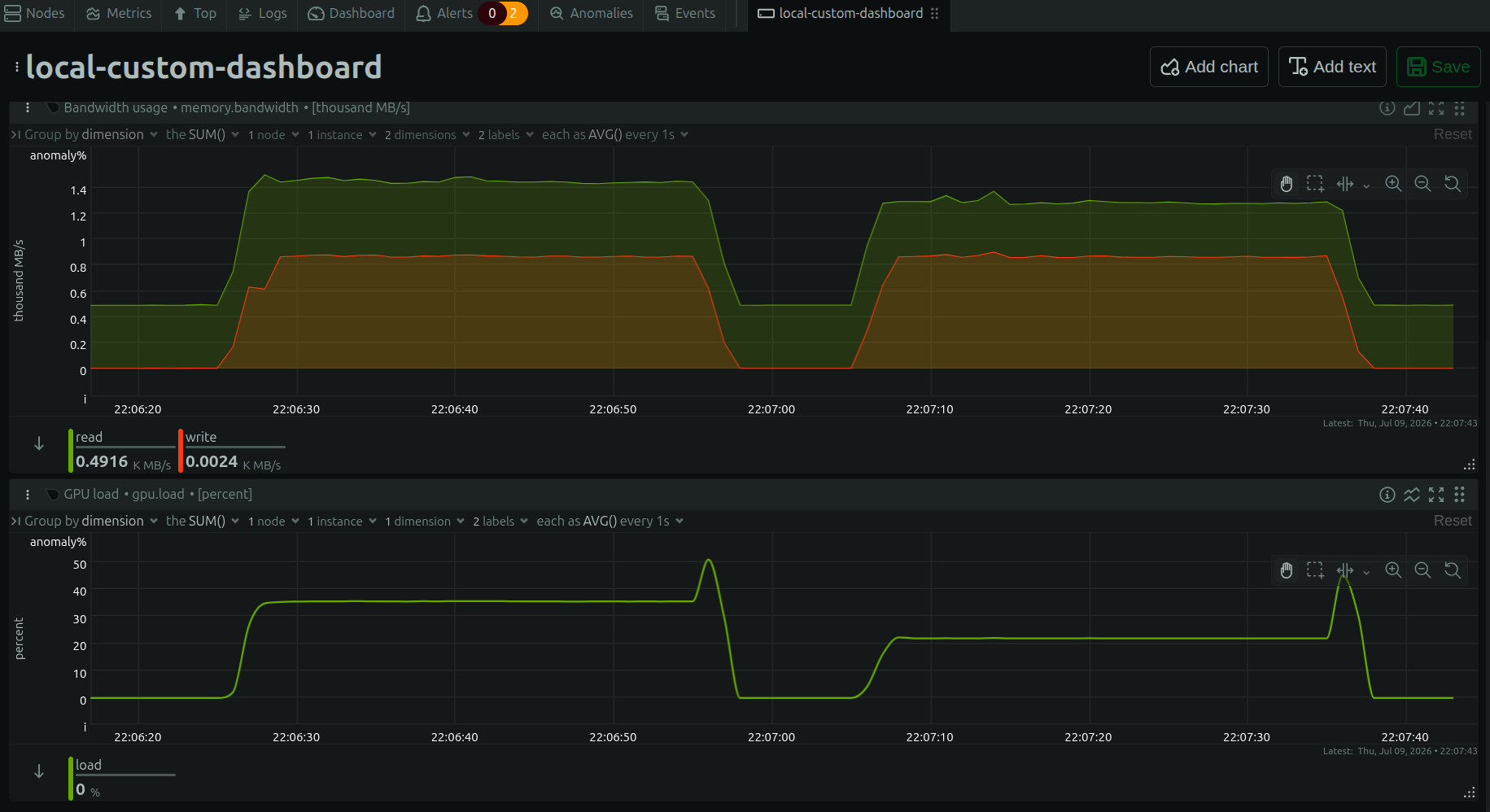
The left plateau is TextureMapper, the right one is the Skia compositor running the very same animation.
Look at the two plateaus: on the left TextureMapper holds the GPU at around 37%, on the right the Skia compositor runs the identical animation at around 22%, with the memory read bandwidth (the green trace) coming down with it. That gap is pure compositor efficiency.
Now let’s talk about damaging…
If you have never come across the term, my colleague Paweł Lampe wrote a great introduction to damage propagation in the WPE and GTK WebKit ports, and I will only summarize it here. Damage is, in his words, the region of web page view that changed since previous frame and requires repainting. In practice that region is almost always a small collection of rectangles that cover whatever moved, appeared or disappeared since the last frame.
The reason we care is simple: a browser that animates something in the corner of the page should not have to repaint and recomposite every single pixel of the viewport sixty times a second when only a small part is actually changing. If the engine can figure out exactly which rectangles changed, the compositor can restrict its work to those, and the windowing system can get away with a partial update of the window/screen rather than a full one. It is a classic trade, a little extra CPU and memory bookkeeping in exchange for a lot less GPU work, which is exactly the trade you want on the embedded devices the WPE port tends to run on, where the GPU is usually the scarce resource.
Knowing that a single layer changed is not enough on its own, because both the compositor and the windowing system work on the whole picture, not one layer at a time. So whatever changes on a layer, an element repainting, or a transform, filter, opacity or similar property change on the layer itself, first has to be collected as layer damage, and every layer’s damage gets merged into a single frame damage for the whole picture. Two things consume that frame damage: the compositor redraws only the damaged rectangles, and the windowing system presents only the changed region.
Paweł did the original work on the TextureMapper compositor: he wrote the code that collects the damage in the first place. In that old implementation the compositing restriction was coarse. TextureMapper scissored to the bounding box of the damage rather than drawing the individual rectangles, and it was off by default, so in practice the damage mostly served to restrict the partial updates sent to the windowing system. The collected damage was still plagued by inconsistencies that showed up as visual glitches, and those were hard to fix in the TextureMapper code, which was much harder to reason about. What follows is how I moved that idea onto our new Skia-based compositor, refactoring a good part of it along the way.
Bringing damage to the Skia compositor
Damage propagation itself had been on by default on GTK since May 2025, but the piece that matters here, using that damage to restrict what actually gets recomposited, was off by default everywhere. To use it on the Skia compositor, and to be able to switch it on at all, I had to do two things: make the collected damage trustworthy, so that it covers every pixel that changes and never misses one, and teach the Skia compositor to restrict its drawing to the damaged rectangles instead of redrawing the whole layer. That turned into a chain of patches, each fairly complex, that landed in July 2026. Let me walk through them in the order they build on each other.
Making the damage trustworthy
Correctness was the first thing to get right: a compositor that repaints only the damaged rectangles has to trust that damage completely, because a single changing pixel that never gets reported keeps its old value on the screen until something unrelated happens to repaint that area.
Two major problems had to be solved. First, each composited layer paints into a backing store, a surface split into
multiple tiles, and damage was recorded when a piece of content was invalidated and the tiles covering it were
repainted. But a lot of the state the compositor applies while drawing a layer never invalidates any content at all:
its filters, masks, clip paths, blend modes, etc. all change the pixels the compositor produces, yet none of them
dirties a tile, so no damage was recorded for them. An animated background-position on a directly composited
background image, for instance, only shifts the contents tile phase, so the old code reported no damage and the
animation simply froze. The fix was to damage the whole layer whenever any of that state
changes.
Second, and more subtly, some damage cannot be found by a simple walk of the layer tree at all. A layer that is detached or destroyed is no longer part of the tree, so a tree walk can no longer capture it, leaving whatever it had painted behind on screen with nothing to repaint over it. Masks are not part of the tree walk, backdrop filters paint nothing of their own but have to be redrawn whenever the content behind them changes, and a blur or a contents rectangle can paint outside the layer’s own bounds. I reworked the collection so that the root layer keeps a record of where every layer painted, two rectangles per layer, where it painted last frame and where it paints now, and compares them every frame instead of each layer reporting its own changes. A layer whose rectangle moved, damages both the old location and the new one. Any layer the walk does not visit has disappeared, so the area it used to cover is repainted and its record dropped. This is the patch that brought the collected frame damage close to covering every pixel the frame changes, which is the precondition for turning the feature on without artifacts.
That work didn’t start with those two patches, though. Through May and June a run of smaller fixes had already gone in on the Skia side, for damage that came out wrong when a layer was painted more than once for overlapping regions and again when the cleanup after those repeated paints was missing, for opacity animations whose float value was truncated before it was compared, and for content layers that were simply damaged every frame. Scrollbars needed two attempts of their own: the first, in June, was to limit their damage to what they actually paint. The second came in early August, once propagation was on and the scrollbars started flickering. That was well after the feature had initially been turned on, and it was not the last correctness fix either: opacity animations were found not to damage their descendant layers as late as the end of the month. We are converging on a state where damage is universally correct. If you try the next WPE or GTK release, keep an eye out for (and report) any rendering glitches we might not have noticed ourselves.
Restricting Skia’s drawing to the damage
With the damage trustworthy, the other half was getting the Skia compositor to draw only the damaged rectangles. The
foundational piece is small and easy to miss: a rectsForPainting() helper on
Damage that returns rectangles
which never overlap and never exceed the number of cells of the damage grid. That grid is how Damage keeps itself
bounded: it keeps every rectangle it is given up to a fixed limit, and beyond that it maps them onto a coarse grid, 256
pixel cells by default, holding one rectangle per cell and merging anything that lands in the same cell into its
bounding box. The limit itself is a tunable
preference rather than the hardcoded
four it started as. Both properties matter for a compositor that draws each rectangle on its own. Overlapping rectangles
would composite translucent content twice, and an unbounded count of them would turn a single draw into arbitrarily
many. It took several iterations to arrive at that innocent-looking helper, with a good deal of trial and error and
performance measurement along the way.
The interesting constraint on the Skia side is batching, and it shaped almost every decision that followed. When the compositor draws a tiled backing store or an image, Skia can pack many small draws that share a single paint into one GPU operation. That batching is a big part of why the Skia compositor is fast, and damage must not break it. So when I taught the tile and image draws to split themselves by damage rectangle, I did not impose any limit on how many pieces a single draw can turn into. Each sub-rectangle of a draw shares the same paint, so Skia still batches them into one operation, no matter how many there are. The tempting alternative, clipping the whole canvas to the damage region, would break the batching: a clip of more than one rectangle cannot be expressed as a simple scissor, so Skia would fall back to a stencil buffer or a mask texture.
In practice each draw is planned against the damage region before it is issued. If the damage already covers the draw whole there is nothing to trim and it goes through untouched. That check matters more than it looks, because its absence is the deep spike in the graph further up. Without it a draw was still planned and split against the damage even when the damage covered it completely, which is pure overhead for no saving at all. On the composition benchmark that more than halved the score, from about 148% to about 64% (compared to TextureMapper performance), and the feature had to be switched off again until the check landed three days later. In general the planner picks one of three strategies:
- Skip, when the draw does not touch the damage at all, so it is dropped before it costs anything.
- SplitByRect, the normal path, where the draw becomes one draw per damage rectangle it touches, each one trimmed in local coordinates to that rectangle, so that only the matching part of the source image is sampled.
- ClipToDamage, the fallback taken when the transform is rotated or skewed. Device-space rectangles no longer map back to rectangles in local space, so splitting is impossible, the batch is flushed and the draw is issued once under a device-space clip (slow path).
That last case is the only one where the canvas gets clipped at all. The rule that came out of this, and that every later piece has to honour, is that each draw restricts itself to the damage rather than the canvas being clipped for it.
Finally I had to solve a “chicken-and-egg” problem: a compositor that paints only what changed has to know the full
frame damage before it draws the first pixel, but the old code collected the damage in the very same walk that did the
drawing, so the damage was only complete once everything had already been painted. Having already parameterized the
paint walk by mode, I could split
the compositing walk into two passes:
a damage pass that walks the tree without drawing, into an SkNoDrawCanvas that discards everything, and gathers the
frame damage, followed by a paint pass that actually draws. Both run from a single paint() call that applies the
animations and computes the transforms once up front, so the two passes always see exactly the same tree.
With the damage known up front, I could limit every content draw to the target’s repaint region. The target is the buffer the compositor draws into, and an empty repaint region means it is already up to date, so nothing is drawn at all. Otherwise every kind of content, the backing store’s tiles, a contents image, a solid color, the composite of an intermediate surface where one is still needed, etc. restricts itself to the damage rectangles. A region that happens to cover the whole surface is dropped and we just do a full repaint, and that decision is made from the actual rectangles rather than their bounding box, because two small rectangles in opposite corners span a huge box while covering almost nothing.
There is one more correctness twist that is easy to overlook. The compositor does not draw into the same buffer every frame. It uses a swap chain, and hands back whichever buffer happens to be free, which is usually a frame or more behind the one on screen. Repainting only “what changed since last frame” is wrong if the buffer you are drawing into is several frames stale. So each buffer needs its own record of everything that changed since it was last drawn into. Building on an earlier patch that had already moved the per-buffer bookkeeping into its own tracker, I gave the swap chain a proper damage tracker that adds the damage of each frame to every buffer as it happens, and clears the record of a buffer only when that buffer is presented, so the guarantee finally holds: each buffer’s damage record covers everything that changed since it was last current.
Turning it on
The final patch just wires the pieces
together behind the
UseDamagingInformationForCompositing feature flag, off by default at that point. The damage of each frame goes to two
places, the windowing system that will present it, and the record kept on every swap-chain buffer. The compositor then
reads the record of the buffer it is about to draw into, takes the union with the damage freshly collected for this
frame, and restricts its drawing to the resulting region. A surprising number of small things had to be handled
correctly, mostly around the debug overlays. The debug border and the repaint counter are painted by the layer tree, but
their setters stored the new state without damaging anything, so nothing repainted them when they appeared or changed.
The FPS counter and the damage
visualizer are drawn outside the tree
entirely, so no layer damages them at all and they have to do it themselves, the counter for its own box and the
visualizer by forcing a full repaint.
Does it pay off?
MotionMark itself is not the right benchmark to answer that question. Its subtests are built to stress the browser at a high object count, with most of the visible area changing from one frame to the next by design, so there is little unchanged content left for damage to restrict itself to. That also explains something from the graph earlier: turning damage on, off and back on again barely moved the MotionMark or composition score at all, once the missing whole-draw check was fixed. To actually see the effect, I needed a scene where only part of the picture changes each frame, so I built a small demo for exactly that.
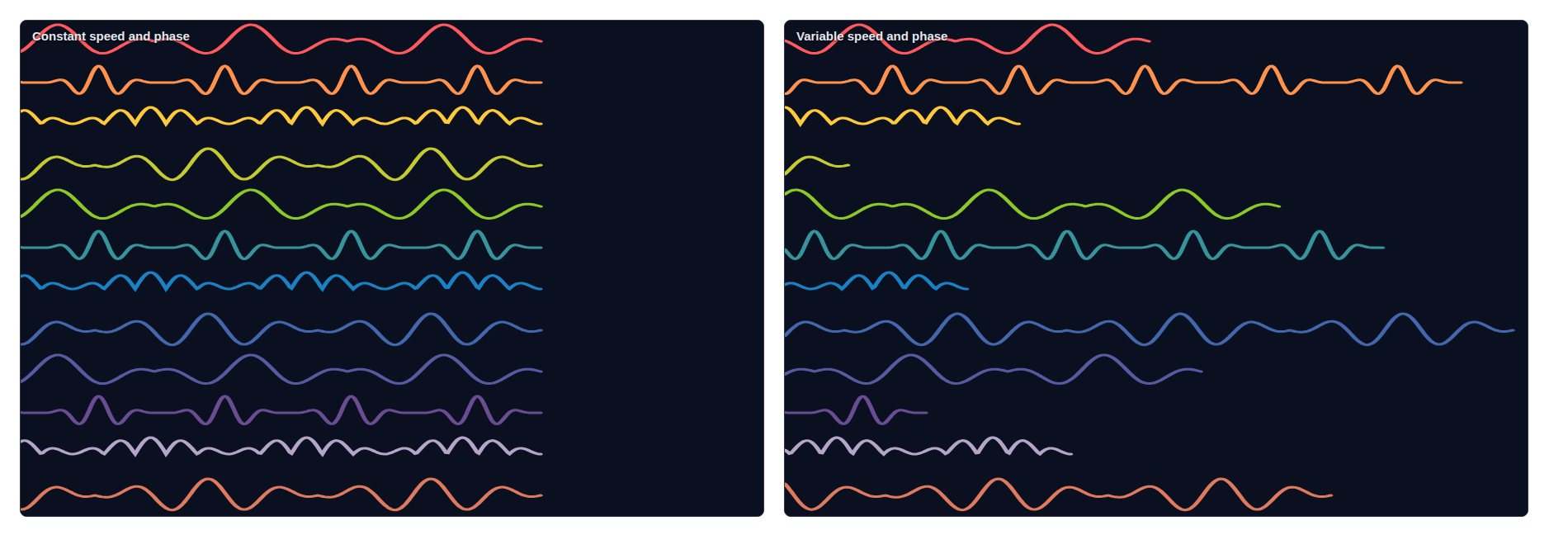
Shortly after the animation starts: on the left every wave has advanced the same distance, since they all share the same speed. On the right they don't, so some have barely left the edge while others have already crossed the whole screen and wrapped around.
The demo draws twelve waves with SVG that travel across the screen from left to right. In the first variant all twelve share the same speed and phase, so the picture changes in a regular, predictable way. In the second variant each wave runs at its own speed, some slower, some faster, so the changing region is much more irregular from frame to frame. That second case is the harder one for a damage-based compositor, because the damage is scattered rather than contiguous. It gets more interesting whenever a wave wraps from the right edge of the screen back to the left: for a sequence of frames the damage sits in two distant regions at once, on opposite sides of the screen, which is exactly the case where taking the bounding box of the damage instead of the actual rectangles would have covered almost the entire screen.
With damage turned on throughout, I ran the demo through the four scenarios formed by crossing the two compositors with the two wave variants, recording GPU load and memory bandwidth for each:
Those four scenarios show up left to right, in that order, in the screenshot below.
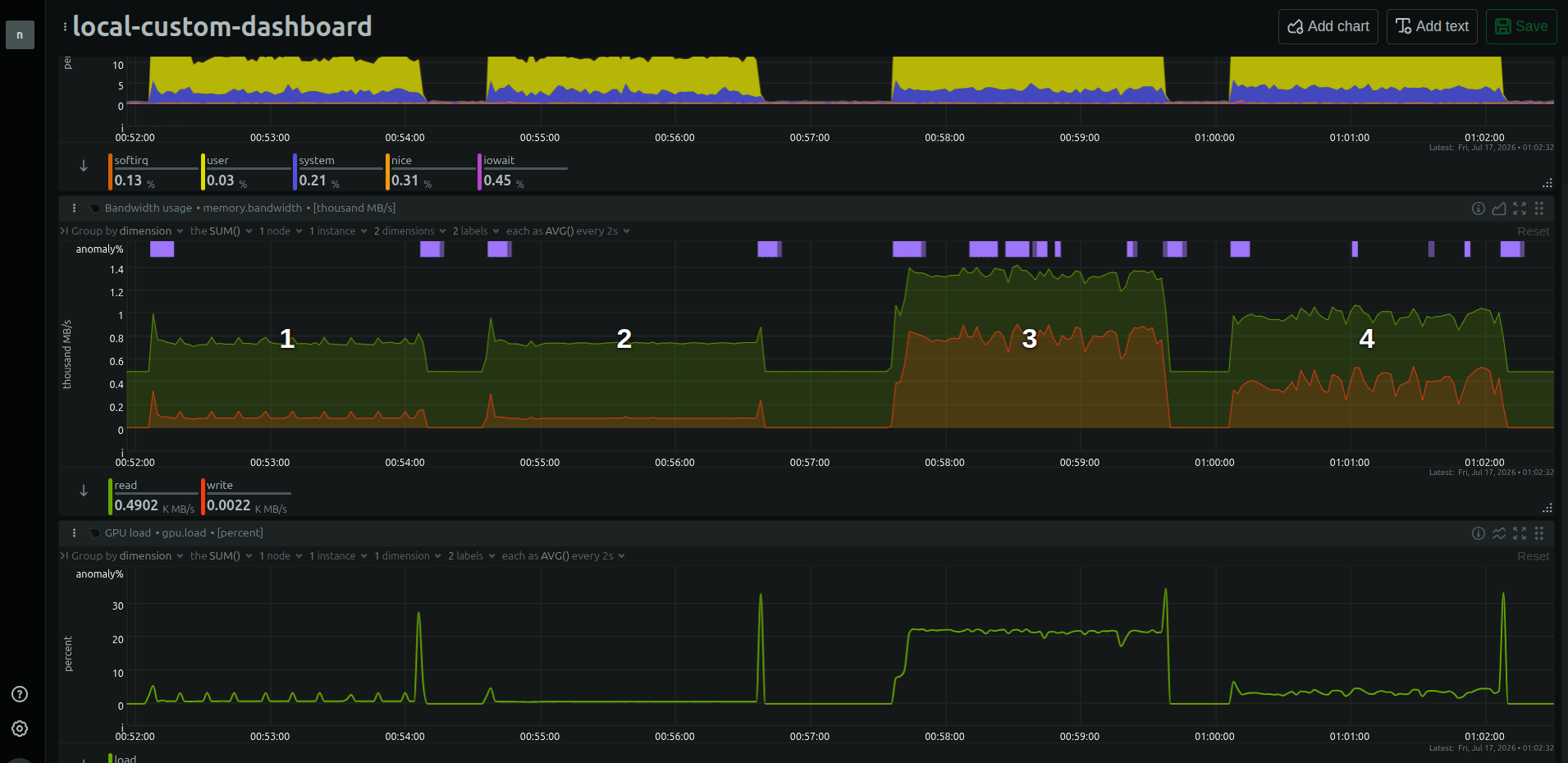
Left to right: TextureMapper then Skia at constant speed, then TextureMapper then Skia at variable speed.
In the constant-speed case, scenario 2 (Skia) against scenario 1 (TextureMapper), the GPU load is only marginally lower, roughly 0.6% against 0.8%. What is striking is not the average but the shape: on TextureMapper the traces show periodic spikes, and on the Skia compositor those are absent. The periodic structure that the compositor used to generate has disappeared.
The variable-speed case, scenario 4 (Skia) against scenario 3 (TextureMapper), is where the win is unambiguous. This is the harder, scattered-damage workload, and here the Skia compositor brings the GPU load down from a plateau around 20% on TextureMapper to only a few %, and the memory read and write bandwidth come down with it. Exactly the scenario you would expect to be hardest for damage is the one where the new compositor shines.
Was it worth it?
The rewrite from TextureMapper to the Skia compositor was initially not driven by achieving better performance, it was about having a compositor that is maintainable and easier to reason about, and it paid off in ways that go beyond raw numbers: filters, masks and blend modes all became simpler to implement and faster to run. Adapting WPE and GTK to run on Vulkan will also be much easier now. That covers the compositor rewrite itself. And finally we have complete damage support, the collected damage trustworthy and the Skia compositor restricting every draw to just those rectangles without breaking its batching, allowing us to substantially reduce the amount of work done per frame.
All of it is switched on by default now, on both GTK and WPE, and the numbers back it up: roughly 45% faster on the composition benchmark, 35% faster on plain MotionMark, and on the twelve waves demo, GPU load drops from a plateau around 20% down to only a few% in exactly the case damage is built for, a scene where most of the screen stays the same from one frame to the next. That is the whole point of this work: a compositor that does only the work a change actually needs.
A big thank you to Carlos Garcia Campos, who has been driving the Skia compositor effort, and to Alejandro G. Castro, who patiently reviewed most of the damage series. And of course to Paweł Lampe, whose original damage work and blog post this all builds on. Thanks for reading to the end :-)