Building a Custom HTML Context Menu with the New WPEPlatform API
WPE WebKit is a WebKit port optimized for embedded devices — think set-top boxes, digital signage, kiosk displays, and in-vehicle infotainment systems. It is developed by Igalia and powers web experiences on millions of devices worldwide, from set-top boxes to smart TVs and beyond.
WPE WebKit has recently introduced a brand-new platform API called WPEPlatform, which replaces the legacy libwpe + wpebackend-fdo stack. In this post, I will walk you through building a minimal WPE browser launcher using only the new WPEPlatform API, and demonstrate one of its newly available features: the Context Menu API — rendered entirely as an HTML overlay.
Why a New API? #
The legacy stack (libwpe + wpebackend-fdo + Cog platform plugins) had several pain points: nested Wayland compositor complexity, dependency on Mesa’s now-deprecated EGL_WL_bind_wayland_display extension, rigid C function-pointer tables, and platform code scattered across three libraries.
The new WPEPlatform API replaces all of this with a single, clean GObject-based layer — providing automatic backend creation, DMA-BUF direct buffer sharing, unified window management (fullscreen, maximize, resize, title), and easy language bindings via GObject Introspection.
Timeline: The stable release of WPEPlatform is planned for September 2026. At that point, the legacy API will be officially deprecated. We strongly recommend new projects to adopt the WPEPlatform API from the start.
WPEPlatform Launcher: A Minimal Browser in ~250 Lines #
To demonstrate the new API, I built WPEPlatformLauncher — a minimal but functional WPE WebKit browser that uses only the WPEPlatform API. No legacy libwpe, no wpebackend-fdo, no Cog — just the new API.
The full source code is available at: kate-k-lee/WebKit@aed6402
How Simple Is It? #
Here is the core of the launcher — creating a WebView with the new API:
/* WPEPlatform backend is created automatically — no manual setup needed */
auto* webView = WEBKIT_WEB_VIEW(g_object_new(WEBKIT_TYPE_WEB_VIEW,
    "web-context", webContext,
    "network-session", networkSession,
    "settings", settings,
    "user-content-manager", userContentManager,
    nullptr));

/* Get the WPEPlatform view — this is where the new API shines */
auto* wpeView = webkit_web_view_get_wpe_view(webView);
auto* toplevel = wpe_view_get_toplevel(wpeView);

/* Window management: fullscreen, resize, title — all built-in */
wpe_toplevel_fullscreen(toplevel);
wpe_toplevel_resize(toplevel, 1920, 1080);
wpe_toplevel_set_title(toplevel, "WPEPlatform Launcher");

/* Input events: just connect a GObject signal */
g_signal_connect(wpeView, "event", G_CALLBACK(onViewEvent), webView);
Compare this with the legacy API, which required:
- Manually creating a
WPEToolingBackends::ViewBackend - Wrapping it in a
WebKitWebViewBackendwith a destroy callback - Creating a C++
InputClientclass and registering it - Having no window management (no maximize, minimize, title, etc.)
The new API handles backend creation, display detection, and input forwarding automatically.
Keyboard Shortcuts #
Handling keyboard events is straightforward with the WPEPlatform event system:
static gboolean onViewEvent(WPEView* view, WPEEvent* event, WebKitWebView* webView)
{
    if (wpe_event_get_event_type(event) != WPE_EVENT_KEYBOARD_KEY_DOWN)
        return FALSE;

    auto modifiers = wpe_event_get_modifiers(event);
    auto keyval = wpe_event_keyboard_get_keyval(event);

    /* Ctrl+Q: Quit */
    if ((modifiers & WPE_MODIFIER_KEYBOARD_CONTROL) && keyval == WPE_KEY_q) {
        g_application_quit(g_application_get_default());
        return TRUE;
    }

    /* F11: Toggle fullscreen via WPEToplevel */
    if (keyval == WPE_KEY_F11) {
        auto* toplevel = wpe_view_get_toplevel(view);
        if (wpe_toplevel_get_state(toplevel) & WPE_TOPLEVEL_STATE_FULLSCREEN)
            wpe_toplevel_unfullscreen(toplevel);
        else
            wpe_toplevel_fullscreen(toplevel);
        return TRUE;
    }

    return FALSE;
}
HTML-Based Context Menu: Solving the “No Native UI” Challenge #
WPE WebKit is designed for embedded environments where there is no native UI toolkit — no GTK, no Qt. This means features like context menus (right-click menus) that desktop browsers take for granted need to be implemented by the application.
The approach: intercept WebKit’s context-menu signal, read the menu items, and render them as an HTML/CSS overlay injected into the page DOM.
The Architecture #
User right-clicks
  → WebKit emits "context-menu" signal
  → onContextMenu() handler:
      1. Reads menu items via webkit_context_menu_get_items()
      2. Gets position via webkit_context_menu_get_position()
      3. Builds JavaScript that creates DOM elements
      4. Injects via webkit_web_view_evaluate_javascript()
      5. Returns TRUE (suppresses default menu)

User clicks a menu item
  → JS: window.webkit.messageHandlers.contextMenuAction.postMessage(actionId)
  → C: onContextMenuAction() receives the action ID
      → Executes: webkit_web_view_go_back(), execute_editing_command("Copy"), etc.

User clicks outside the menu
  → JS: overlay click handler removes the DOM elements
Reading Context Menu Items #
The Context Menu API provides everything we need:
static gboolean onContextMenu(WebKitWebView* webView,
    WebKitContextMenu* contextMenu, gpointer /* event */,
    WebKitHitTestResult* hitTestResult, gpointer)
{
    /* Save hit test result for link-related actions */
    savedHitTestResult = WEBKIT_HIT_TEST_RESULT(g_object_ref(hitTestResult));

    /* Iterate through menu items */
    GList* items = webkit_context_menu_get_items(contextMenu);
    for (GList* l = items; l; l = l->next) {
        auto* item = WEBKIT_CONTEXT_MENU_ITEM(l->data);

        if (webkit_context_menu_item_is_separator(item)) {
            /* Render as a horizontal line */
            continue;
        }

        const char* title = webkit_context_menu_item_get_title(item);
        auto action = webkit_context_menu_item_get_stock_action(item);
        /* Build HTML element with title and action ID */
    }

    /* Get position for menu placement */
    gint posX = 0, posY = 0;
    webkit_context_menu_get_position(contextMenu, &posX, &posY);

    return TRUE; /* Suppress default menu */
}
The HTML Menu: Dark Theme for Embedded #
The context menu is rendered with a dark theme CSS, designed for embedded/kiosk displays:
#__wpe_ctx_menu {
    position: fixed;
    min-width: 180px;
    background: #2b2b2b;
    border: 1px solid #505050;
    border-radius: 6px;
    padding: 4px 0;
    box-shadow: 0 8px 24px rgba(0,0,0,0.4);
    font-family: system-ui, sans-serif;
    font-size: 13px;
    color: #e0e0e0;
}

.__wpe_ctx_item:hover {
    background: #0060df;
    color: #ffffff;
}
Handling Actions via Script Message Handler #
Communication between the HTML menu and the C application uses WebKit’s script message handler mechanism:
/* Register message handler */
auto* ucm = webkit_user_content_manager_new();
webkit_user_content_manager_register_script_message_handler(
    ucm, "contextMenuAction", nullptr);
g_signal_connect(ucm, "script-message-received::contextMenuAction",
    G_CALLBACK(onContextMenuAction), nullptr);
// In the generated HTML menu item:
item.addEventListener('click', function() {
window.webkit.messageHandlers.contextMenuAction.postMessage(actionId);
});/* Handle the action in C */
static void onContextMenuAction(WebKitUserContentManager*, JSCValue* value, gpointer)
{
int actionId = jsc_value_to_int32(value);
switch (actionId) {
case WEBKIT_CONTEXT_MENU_ACTION_RELOAD:
webkit_web_view_reload(webView);
break;
case WEBKIT_CONTEXT_MENU_ACTION_COPY:
webkit_web_view_execute_editing_command(webView, "Copy");
break;
case WEBKIT_CONTEXT_MENU_ACTION_OPEN_LINK:
webkit_web_view_load_uri(webView,
webkit_hit_test_result_get_link_uri(savedHitTestResult));
break;
/* ... more actions ... */
}
}Demo #
Here is the WPEPlatformLauncher in action, showing the HTML context menu with various actions:

Right-clicking shows the HTML context menu. Clicking “Reload” triggers an actual page reload.
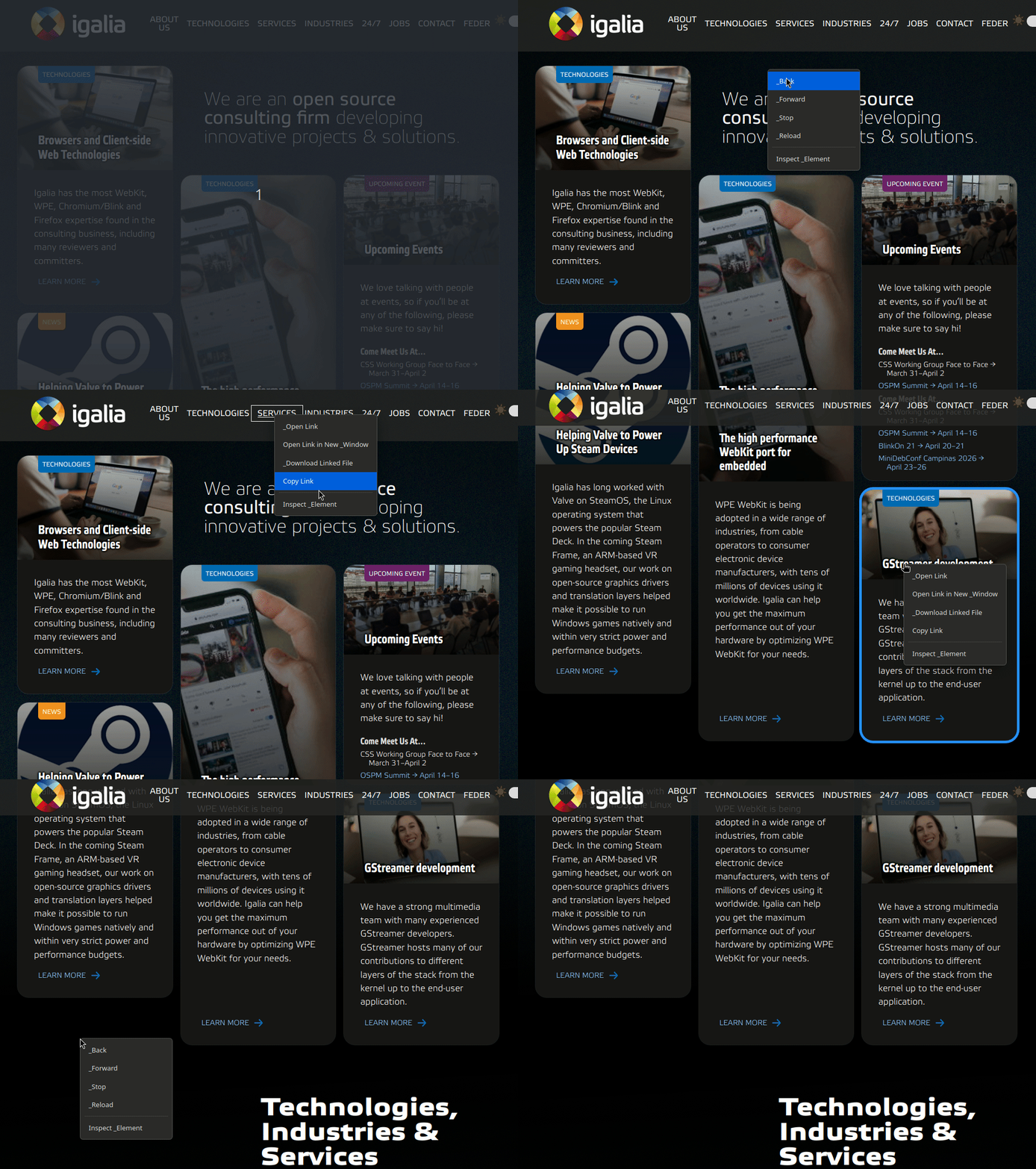
Right-clicking a link shows link-specific actions like “Open Link” and “Copy Link Address”.
Building and Running #
I built and ran the WPEPlatformLauncher inside a container using the WebKit Container SDK, which provides a pre-configured development environment with all the dependencies needed to build WPE WebKit.
The WPEPlatformLauncher integrates into the WebKit build system:
# Build WPE WebKit with the launcher
Tools/Scripts/build-webkit --wpe --release

# Run
./WebKitBuild/WPE/Release/bin/WPEPlatformLauncher https://wpewebkit.org

# Run in fullscreen (kiosk mode)
./WebKitBuild/WPE/Release/bin/WPEPlatformLauncher --fullscreen https://your-app.com
The full source is a single main.cpp file (~600 lines including the context menu), integrated into the WebKit tree alongside MiniBrowser:
WebKit/Tools/
├── MiniBrowser/wpe/          ← Existing (supports both old + new API)
├── WPEPlatformLauncher/      ← New (WPEPlatform API only)
│   ├── main.cpp
│   └── CMakeLists.txt
└── PlatformWPE.cmake         ← Modified to add WPEPlatformLauncher
Summary #
The new WPEPlatform API makes building WPE WebKit applications significantly simpler:
- No manual backend setup — the platform is detected and configured automatically
- GObject-based — signals, properties, and ref counting instead of C function pointers
- DMA-BUF direct sharing — no dependency on Mesa’s deprecated EGL extensions
- Unified window management — fullscreen, maximize, minimize, resize, and title
- Language binding friendly — works with Python, JavaScript, and more via GObject Introspection
For embedded browser developers building kiosk UIs, set-top box interfaces, or digital signage with WPE WebKit — now is the time to adopt the new API. The stable release is coming in September 2026, and the legacy stack (libwpe, wpebackend-fdo, Cog) will be deprecated at that point.