
Asynchronous scrolling for touch events in WPE and WebKitGTK
The WPE and GTK ports have supported touch events for a long time, but asynchronous scrolling only worked for wheel events. Scrolling driven by touch still depended on the web process main thread. This change puts touch events on the asynchronous scrolling path too.
Let’s start with the background: what asynchronous scrolling is and why it needs to be built differently here.
What is asynchronous scrolling? #
Why it is needed #
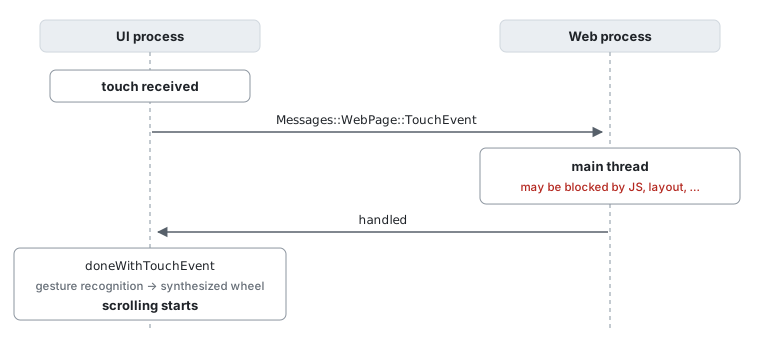
A naive implementation of scrolling looks like this:
- The UI process receives an input event (wheel or touch).
- It sends the event to the web process main thread.
- The main thread runs the page’s JavaScript event listeners.
- If nothing called
preventDefault(), the scroll position is updated. - The page is rendered at the new scroll position.
Step 3 is the problem. The main thread is easily blocked for hundreds of milliseconds by JavaScript execution or layout, and scrolling is frozen for that whole time. Your finger moves, the screen does not. That is what synchronous scrolling feels like.
Asynchronous scrolling moves the work off the main thread: the scrolling thread updates the scroll position, and the compositor thread composites and presents the frame. Neither needs the main thread, so scrolling keeps running at 60fps even when the main thread is busy.
The scrolling tree and event regions #
Two data structures make this possible.
The scrolling tree is a tree of the scrollable areas of a page. The main
frame, overflow: scroll elements, position: fixed/sticky elements and so on
each become a node holding its own scroll position and a reference to its layer.
The scrolling thread updates scroll positions by looking only at this tree, and
the compositor thread then draws the layers at their new positions — the main
thread is not involved in either step.
But there are places where scrolling on its own would be wrong, because the page
might call preventDefault() from an addEventListener("touchstart", ...)
handler. That is what event regions are for.
An event region records, per layer and at rendering time, “this rectangle has a
listener for this kind of event”. EventRegion keeps separate regions for
touchstart, touchmove, pointerdown, mousedown and friends, and for any
given point it yields a TrackingType:
enum class TrackingType : uint8_t {
    NotTracking = 0,   // No listener. The event does not even need to be delivered.
    Asynchronous = 1,  // Passive listeners only. Scroll now, notify the page later.
    Synchronous = 2    // A non-passive listener may call preventDefault(). We must wait.
};
The passive distinction is what makes Asynchronous possible.
preventDefault() cancels an event only if the listener was registered with
passive: false; from a passive listener it does nothing. And on window,
document and document.body, touchstart/touchmove (and wheel) default to
passive: true — see
MDN: Using passive listeners.
So Asynchronous is the case “there are listeners, but none of them can cancel
the scroll”: start scrolling now, deliver the event to the main thread
afterwards.
Because this information travels to the scrolling thread along with the layer tree, an incoming input event can be classified without waking the main thread. That is the heart of asynchronous scrolling.
Why the iOS implementation could not be reused #
The iOS port already implements asynchronous scrolling for touch events, but it could not be reused, because the process layout is different.
iOS:
  UI process:  platform layer tree + scrolling tree + touch event input
  Web process: main thread (DOM, layout)

WPE / GTK (Coordinated Graphics):
  UI process:  touch event input only
  Web process: main thread (DOM, layout)
               + EventDispatcher thread / scrolling thread
               + platform layer tree + scrolling tree
On iOS both the platform layer tree and the scrolling tree live in the UI process — the very process that receives touch events — so the classification and the scroll both happen right there. On WPE and GTK we use Coordinated Graphics, and both trees live in the web process instead. The classification therefore has to happen after sending the event to the web process, but before touching the main thread.
Fortunately the same problem was already solved for wheel events. The web process has an EventDispatcher thread that receives wheel events from the UI process without going through the main thread and consults the scrolling tree directly. This change builds the same shape for touch events.
How a touch becomes a scroll in WPE #
One more piece of background: in WPE a touch does not scroll the page directly. Touch events are first offered to the page; only if the page does not consume them does the UI process turn the touch sequence into scrolling.
The decision point is PageClientImpl::doneWithTouchEvent(). If the page handled
the event, gesture detection is cancelled with
wpe_gesture_controller_cancel() so the engine does not also act on it. If it
was not handled, the event is fed to the WPE platform gesture controller via
ViewPlatform::handleGesture(), and a recognized WPE_GESTURE_DRAG is turned
into a synthetic scroll event pushed back into the page as a wheel event:
GRefPtr<WPEEvent> simulatedScrollEvent = adoptGRef(wpe_event_scroll_new(
    m_wpeView.get(), WPE_INPUT_SOURCE_TOUCHSCREEN, 0, static_cast<WPEModifiers>(0), dx, dy, TRUE, FALSE, x, y));
page().handleNativeWheelEvent(WebKit::NativeWebWheelEvent::create(simulatedScrollEvent.get(), phase));
That TRUE is precise_deltas: touch-driven scrolling in WPE reaches the engine
as precise-delta wheel events, which becomes relevant later.
The important consequence is this: the UI process cannot start scrolling until it knows whether the page is going to consume the touch. That answer used to come from the web process main thread — so when the main thread was busy, scrolling did not start. That is the problem this change fixes.
The change #
Enabling touch event regions #
A new ENABLE(COORDINATED_TOUCH_EVENTS) is introduced in PlatformEnableGlib.h,
and it turns on ENABLE(TOUCH_EVENT_REGIONS) whenever touch events are enabled
on WPE/GTK. The AlwaysUseTouchEventRegions preference now defaults to true
under that flag, so Document::shouldUseTouchEventRegions() returns true and
touch regions are actually recorded on the layers during rendering.
UI process: send to the EventDispatcher instead of the main thread #
The old WebPageProxy::handleTouchEvent() consulted a touchEventTracking state
kept in the UI process and sent Messages::WebPage::TouchEvent, i.e. straight to
the web process main thread.
The new version delegates all classification to the web process and only queues
events and delivers answers. One event is in flight at a time; the next is sent
when the reply arrives. The flood of touchmove events produced while a finger
moves is coalesced into the newest queued event when that is also a touchmove,
and the coalesced events are flushed to doneWithTouchEvent() together with the
reply.
The destination is now Messages::EventDispatcher::TouchEvent.
Web process: classification on the EventDispatcher thread #
EventDispatcher::touchEvent() runs on the EventDispatcher thread, where it
looks up the page’s scrolling tree, asks it for a TrackingType, and splits
three ways:
- NotTracking — no listeners. Reply
handled = falseimmediately, without bothering the main thread at all. The UI process can start scrolling right away. - Asynchronous — passive listeners only, so nothing can cancel the event.
Reply
handled = falsefirst so scrolling starts, then deliver the event to the main thread. - Synchronous — a non-passive listener may call
preventDefault(), so wait for the main thread result as before.
Replying without a main thread round trip is possible because the new
TouchEvent message is declared AnyThread in EventDispatcher.messages.in.
The iOS equivalent is MainThreadCallback, which always replies from the main
thread.
If there is no scrolling tree for the page yet, the event goes to the main thread as before.
Classifying a touch in the scrolling tree #
The classification itself is
ScrollingTreeCoordinated::eventTrackingTypeForTouchEvent(). It works in two
stages.
First, for each newly pressed touch point: convert the point from view to contents coordinates,
hit test the layer tree down from the root contents layer, take the frontmost
layer whose event region contains the point, and query that region. It is queried
for many event types, because a touch fires more than the DOM touch* events —
pointer*, compatibility mouse events and gesture* too, and a non-passive
listener for any of them forces synchronous handling. The results are folded into
a small TouchEventTracking struct with four fields: start, move, end and
force-change.
Second, the tracking type of the event as a whole is derived from the touch point
states, merging the per-field values. Merging picks the stronger of two types
(NotTracking < Asynchronous < Synchronous), so if any single point needs
synchronous handling, the whole event is synchronous.
TouchEventTracking persists for the lifetime of a touch sequence and is reset
once all points are released, so the hit test done at touchstart is reused for
the following touchmove/touchend. That guarantees a sequence never flips from
synchronous to asynchronous halfway through just because a finger moved off a
listener’s area.
<input type=range> #
A slider handles touches internally even with no JavaScript listener, so looking
at the event region alone would classify it as NotTracking.
HTMLInputElement::updateTouchEventHandler() now sets the
HasInternalTouchEventHandling flag on EventTarget for range inputs, and
StyleAdjuster turns that flag into the full set of touch region types for the
element.
Keeping the animation running on the scrolling thread #
The last piece is in ScrollingEffectsController::handleWheelEvent(). As shown
above, WPE synthesizes wheel events from touch gestures with precise deltas.
Precise-delta events only need immediateScrollBy() to move the scroll
position — but then nothing drives screen updates while the main thread is busy.
The fix is that, while a scroll gesture is in progress, a scroll animation is
also started — from one ULP short of the destination (std::nextafter()) to the
destination. Visually it finishes instantly — the
real scroll is still done by immediateScrollBy() — but a scroll animation is
now running, which starts display link monitoring and keeps compositing driven
regardless of the main thread.
The event flow, summarized #
Before:
After (no listeners, or passive listeners only):
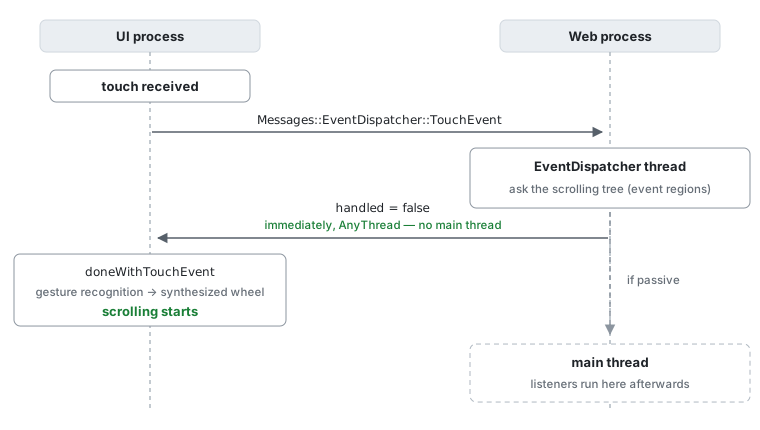
Where a non-passive listener exists, we still wait for the main thread as before.
The spec requires preventDefault() to be honoured, so that is unavoidable.
Layout test updates #
As a side effect, the tests under fast/events/touch/ had to be updated.
Event regions are computed during a rendering update and propagated to the scrolling tree via the platform layer tree. Which means a test like this:
target.addEventListener("touchstart", handler);
tapSoon(20, 20);   // ← the region has not been updated yet!
taps immediately after registering the listener, while the scrolling tree still
believes there is no listener and returns NotTracking. The event never reaches
the main thread and the test fails.
A new UIHelper.renderingComplete() was added for this:
static async renderingComplete()
{
    // Wait for the platform layer tree to be updated
    await UIHelper.animationFrame();
    await UIHelper.animationFrame();
}
Two animation frames are needed because the first one runs the rendering update that computes the regions, and a second is needed for the result to reach the layer tree.
Summary #
- On WPE and GTK both the layer tree and the scrolling tree live in the web process (Coordinated Graphics), so the iOS touch asynchronous scrolling implementation could not be reused directly.
- Instead, touch events were given the same shape that already works for wheel events: ask the scrolling tree from the EventDispatcher thread.
- The keys were enabling touch event regions, and making the IPC reply
AnyThreadso it can be sent without waiting for the main thread. - Anywhere the page has no non-passive listener, scrolling now starts regardless of what the main thread is doing.
Acknowledgements #
Many thanks to Alejandro G. Castro and Carlos Garcia Campos for their insightful reviews of this work, and to Claude for writing this blog post.
- Previous: Async Scrolling Improvements