06.22.08

What could we do with Clutter ?

Posted in GNOME experience, Mobile at 3:59 pm by jfernandez

These last months i’ve been working with Clutter project as part our GNOME R&D project. Firstly, for who don’t know what Clutter project exactly is, i would like to briefly introduce you this technology.The Clutter project has created an open source software library for creating fast, visually rich and animated graphical user interfaces. Clutter uses OpenGL (and optionally OpenGL ES for use on Mobile and embedded platforms) for rendering but with an API which hides the underlying GL complexity from the developer. The Clutter API is intended to be easy to use, efficient and flexible.

Basically, Clutter provides a Canvas for drawing complex graphics and effects. This Canvas could be inserted inside a Gtk context, using the Clutter-Gtk library.

The second part of my post will be focused on my work during last R&D project iteration and what were my thoughts about this new and promising technology; there were several discussions in the gtk-devel list about the new GTK 3.0 evolution and what would be the role of Clutter project.

The best way to understand a technology, after read carefully all related documentation, is to implement a proof of concept. For that purpose, i’ve chosen the YouTube  client applications domain to develop new UI concepts, in order to test the powerful of Clutter as toolkit.

The first thing i’ve realized when i read the Clutter project documentation is that Clutter is not actually a toolkit, as it’s mentioned in Clutter project web page. With my understanding of the toolkit concept, it should be a set of tools for implementing user interfaces. However, user interfaces are not only graphical elements, but window management, theming support, advanced graphical components, translation support, applets and icons management, shortcuts, toolbars and menus or similar ways of activating user actions, … In that sense, Clutter lacks of several important features required to be considered as UI toolkit. I think that, at least at this moment, Clutter could be just considered as a graphical engine or scene graph tool. This point was also mentioned by some people inside gtk developers community who are considering the approach of using Clutter as scene graph concept for the next GTK 3.0.

When finally i began to develop my test application i had assumed that it actually wont be a functional YouTube client application, just an user interface proof of concept. Who knows what will happen in future, but for this project i’ ve focused the development in just one use case: querying for videos and show the results.  For implementing the communication with YouTube web services i’ve found a very interesting implementation of YouTube GData API: libgdata and libgdata-google.These libraries, also used inside evolution-data-server as static libraries, are also provided as independent libraries, at least, in Ubuntu hardy. These libraries, implemented using a GLib GObject approach, provide Client access to google POA through SOAP interface.

During the implementation of this YouTube client application i’ve implemented several UI for showing YouTube top_rated query results. The first approach was obviously a GtkTreeView view.

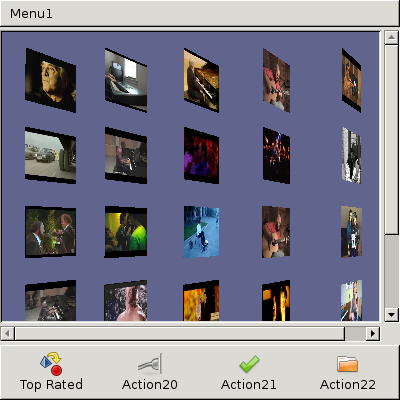
screenshot-youtube-test.png                               screenshot-clutter-ui.png

The first and simpler clutter approach would be to show results in a square grid. I have to say that the square grid its also possible to implement in Gtk, although Clutter provides more fancy effects.

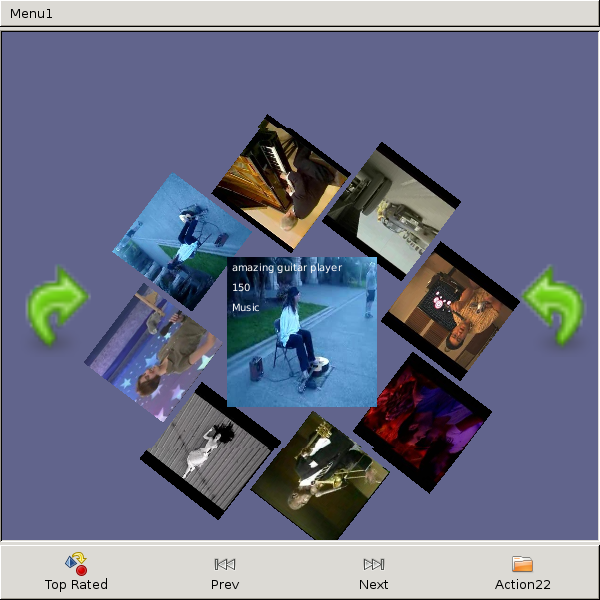
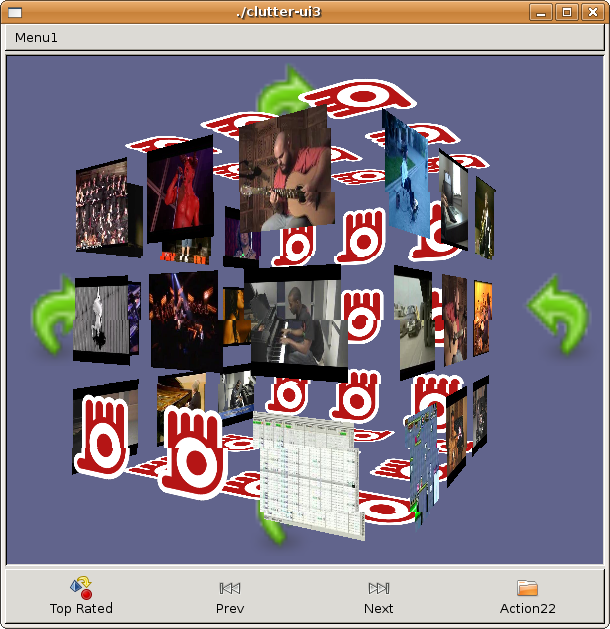
After this first UI proposals, and after understanding better advanced operations with Clutter, i tried to define new ways of showing information, always thinking about how to improve the end user experience.

screenshot-clutter-ui2.png          screenshot-clutter-ui2-1.png          screenshot-clutter-ui3.png

The most interesting questions i’ve made to myself at this point have not been about Clutter technology capabilities, but what new UI concepts we want to achieve. I think there are several graphic technologies today providing new ways of drawing user interfaces, the important point is to define precisely how to present information and services to end users in a more intuitive way.

03.06.08

New feature for GtkUIManager class

Posted in Mobile at 6:28 pm by jfernandez

I’ve been working for several months in the development of the Modest email client. It was a very interesting work, using gtk deeply trying to improve some internal features of the Gtk UI Manager system.

Modest has lots of strict rules about dimming toolbar icons, menu options, action widgets, …. Most applications don’t have a well designed system to manage this kind of events and that behaviour is shared between several files and classes; sometimes these dimming rules are implemented several times, which causes many runtime errors as well as some problems to extend classes and use cases logic.

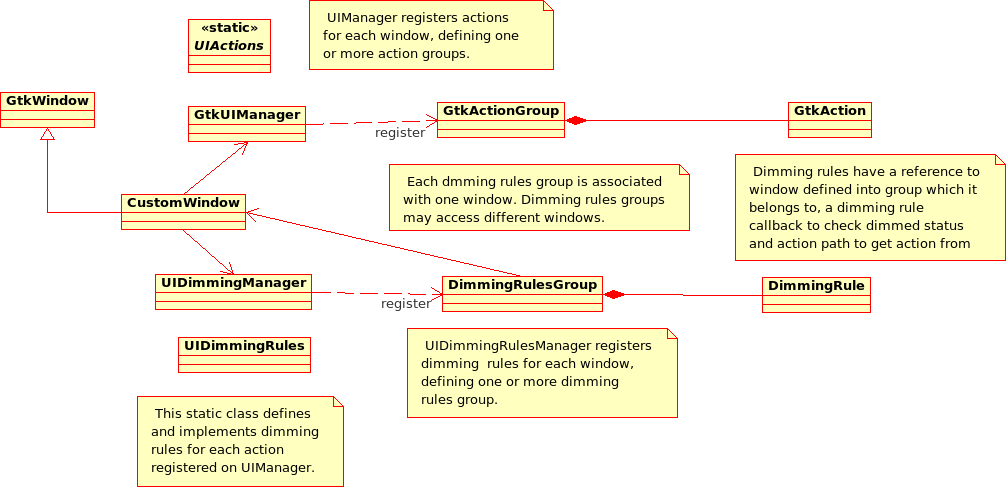
During my work in Modest I designed a system to manage dimming logic in Gtk applications. This design is based on GtkUIManager system and tries to solve the same problem: centralize and simplify UI events on a GtkWindow. The following UML diagram shows an example of this system:

UIDimmingManager class diagram

Implementation details

The next step should be adding this logic to the Gtk core in order to be part of the GtkUIManager system. It will not be very hard to add this behaviour to that class, because UIDimmingManager pattern has the same structure than the Gtk UIManager.

The classes involved in this design and responsibilities are described as follow:

  • UIDimmingManager
    • This class stores and handles UI Dimming Rules Groups . Each rules group has a string name, which will be used inside the manager to execute a specific group. This rules group is stored internally in a hash map; however, a different data structure could be used for that purpose.
    • The API of this class exports two different methods to execute rules:
      • ui_dimming_manager_process_dimming_rules: execute all rules groups.
      • ui_dimming_manager_process_dimming_rules_group: execute a specific rules group.
  • DimmingRulesGroup
    • Stores and handles a dimming rules group.
    • It could also manage two different types of dimming rules:
      • Common dimming rules: This kind of rules are defined for GtkUIManager items, so they have to be defined previously inside the UIManager structure.
      • Widget dimming rules: These rules can be applied to any widget.
    • Each dimming rule could have a notification dialog in order to inform the user why some item is dimmed. This notification system is enabled or disabled for all rules defined in a single group.
  • DimingRule
    • This class actually implements dimming rules behaviour.
    • It should receive three parameters at creation time:
      • Window: a GtkWindow or CustomWindow instance to apply dimming rule.
      • Callback: callback function for checking dimming behaviour.
      • Action path: the path to locate UIAction element, registered in UIManager.
        • This parameter is optional, because for widget dimming rules is not required.
  • UIDimmingRules
    • This element was defined as a plain file, with a list of operations to be used as dimming rules callback.
    • Its similar to the common file used in UIManager stock items implementation for defining actions for each item.

Once you have defined your UIManager structure, with your xml file for defining stock items and UI actions, you only have to define your dimming data structure, very similar to UIManager
structure:

/* Menu Dimming rules entries */
static const DimmingEntry menu_dimming_entries [] = {

/* Email Menu */
{ "/MenuBar/Menu1/Menu1Submenu1/Menu1Submenu1Item1", G_CALLBACK(ui_dimming_rules_on_rule1) },
{ "/MenuBar/Menu1/Menu1Submenu1/Menu1Submenu1Item2", G_CALLBACK(ui_dimming_rules_on_rule1) },
{ "/MenuBar/Menu1/Menu1Item3", G_CALLBACK(ui_dimming_rules_on_rule1) },
{ "/MenuBar/Menu1/Menu1Item4", G_CALLBACK(ui_dimming_rules_on_rule1) },
{ "/MenuBar/Menu1/Menu1Item5", G_CALLBACK(ui_dimming_rules_on_rule1) },
{ "/MenuBar/Menu1/Menu1Item6", G_CALLBACK(ui_dimming_rules_on_rule1) },

{ "/MenuBar/Menu2/Menu2Submenu1/Menu2Submenu1Item1", G_CALLBACK(ui_dimming_rules_on_rule1) },
{ "/MenuBar/Menu2/Menu2Submenu1/Menu2Submenu1Item2", G_CALLBACK(ui_dimming_rules_on_rule1) },
{ "/MenuBar/Menu2/Menu2Item3", G_CALLBACK(ui_dimming_rules_on_rule1) },
{ "/MenuBar/Menu2/Menu2Item4", G_CALLBACK(ui_dimming_rules_on_rule1) },
{ "/MenuBar/Menu2/Menu2Item5", G_CALLBACK(ui_dimming_rules_on_rule1) },
{ "/MenuBar/Menu2/Menu2Item6", G_CALLBACK(ui_dimming_rules_on_rule1) },

{ "/MenuBar/Menu3/Menu3Submenu1/Menu3Submenu1Item1", G_CALLBACK(ui_dimming_rules_on_rule1) },
{ "/MenuBar/Menu3/Menu3Submenu1/Menu3Submenu1Item2", G_CALLBACK(ui_dimming_rules_on_rule1) },
{ "/MenuBar/Menu3/Menu3Item3", G_CALLBACK(ui_dimming_rules_on_rule1) },
{ "/MenuBar/Menu3/Menu3Item4", G_CALLBACK(ui_dimming_rules_on_rule1) },
{ "/MenuBar/Menu3/Menu3Item5", G_CALLBACK(ui_dimming_rules_on_rule1) },
{ "/MenuBar/Menu3/Menu3Item6", G_CALLBACK(ui_dimming_rules_on_rule1) }
};

10.09.07

Using Xephyr on debian sarge

Posted in Mobile at 12:04 pm by jfernandez

To test graphical applications on Scratchbox you have several X server to export display (VNC, Xephyr, …) However, i conclude Xephyr is the best option because its very light and fast. I know the most of developers use testing or experimental version of Debian; however, sometimes is not possible to update your machine due several reasons: important legacy services which require Sarge, too much stress to lose time on it :) , too much busy system administrator, …

In case you want to develop using Scratchbox and Debian Sarge, you should know there is no available version of Xephyr (a very common problem). However, software developers community is great and they always think in all these things to make our life easier. I found a precompiled version of Xephyr, with required static libraries to run it independently of installed Sarge libraries:

http://www.c3sl.ufpr.br/multiterminal/howtos/howto-xephyr-en.htm

The steps to install and run Xephyr on Sarge are very simple:

  1. Download the Xephyr binary here
  2. Extract it into your work directory (pwd).
  3. Export LD_LIBRARY_PATH environment variable to add Xephyr library path:
    • export LD_LIBRARY_PATH=pwd/Xephyr/lib/
  4. Execute Xephyr with the following options:
    • ./bin/Xephyr :2 -host-cursor -screen 800×480x16 -dpi 96 -ac

Obviously, you could add pwd/bin to your PATH environment variable.

09.06.07

Working an learning about Maemo

Posted in Mobile at 8:15 pm by jfernandez

This year i have been working quite a lot on Maemo platform to develop some GNOME applications into a cross-compile architecture. It’s being a very interesting experience, especially be part of GMAE and Maemo developer community and try to provide my experience in some projects.

This kind of development its oriented to mobile devices, which requires a different kind of applications and development strategy. As most of you know, mobile devices frequently needs some kind of external device to store data, cause internal memory is very expensive and therefore limited.

Scratchbox (www.scratchbox.org) its a cross-compiling environment to develop applications oriented to mobile devices. However, its very difficult int this environment to develop functionalities which requires access to this kind of external memory devices.

I found a simple way to emulate external memory devices using, for instance, a common usb key, to catch gnome-vfs events and handle them as it were emitted from an external memory card. From GNomeVFS point of view, these devices are managed in a similar way, so you cant test your uses cases in your PC.

  • Install mount in sbox.
apt-get install mount
  • Edit /etc/fstab file on sbox
    none      /proc         proc   defaults       0 0
    /dev/sdb  /media/memory   vfat   user,noauto    0 0
  • From host, set ownerships and permissions to sbox mount and umount commands
chown root:root /scratchbox/users/jfernandez/targets/i386-2007-07-26/bin/mount
chmod 4755 /scratchbox/users/jfernandez/targets/i386-2007-07-26/bin/mount
chown root:root /scratchbox/users/jfernandez/targets/i386-2007-07-26/bin/umount
chmod 4755 /scratchbox/users/jfernandez/targets/i386-2007-07-26/bin/umount
  • Insert your USB key
  • Mount your virtual file system
mount /media/memory

Now, gnome-vfs monitor could detect mount and umount events of your USB, emulating insertion of an external memory device.